ZDNET’s key takeaways
- Filing bug reports for open-source software is easy.
- Bug reports help developers improve their applications.
- You can submit bug reports from the CLI, a GUI, or a website.
When something goes wrong with an app (such as a feature not working as it should or the app crashing), the tendency is to shrug it off and restart the app. Although that might get you out of a jam, it doesn’t help the developers of the app in question or other users — or prevent you from dealing with that bug again.
What is a bug report?
A bug report is a detailed document that explains a defect, glitch, or unexpected behavior in a piece of software. Bug reports generally include title, summary, steps to reproduce the bug, what should happen if the software behaved properly (expected behavior), actual behavior, environment specifications (device, OS, version), visual evidence and/or log files, and severity/priority. It sounds like a lot of information, but each bit only needs a brief description of what’s going on.
Let’s say App X crashes when opening fileY.docx. Here’s what the bug report might include:
- Title/Summary: App X crashes on certain files.
- Steps to reproduce: Open fileY.docx in the app.
- Expected behavior: App X opens fileY.docx
- Actual behavior: App X crashes.
- Environment specifications: Device – PC, OS – Pop!_OS Linux, version of app 1.0.
- Visual evidence: attached log file for the app (if one exists and can be found).
- Severity & priority: this should be high priority and considered a severe issue.
That’s it. Seven simple lines sent to the developer could help them resolve the problem.
Also: 7 open-source apps worth paying for in 2026
Even if you aren’t able to attach a screenshot or a log file, the above information gives the developer enough to recreate the issue; they can install App X on Pop!_OS Linux and attempt to open a docx file to see if it happens for them. If not, they might reach out to you with instructions on where to find the log file (or you can do a bit of research and find it on your own).
How a bug report helps
A bug report gives a developer a clear picture of the problematic behavior in their app, so they can focus their efforts on fixing it. Without that information, they might not even know the problem exists.
Bug reports also save developers a lot of time because they don’t have to guess how to recreate the issue. If someone reaches out to them and simply says, “Your app keeps crashing,” it’s no help. Developers need to know the specifics so they can reproduce the problem.
Also: The most popular programming languages in 2026
Additionally, bug reports help the development team track issues throughout the app’s software lifecycle and improve communication between users/testers and developers.
How to submit a bug report
Sometimes, when a Linux app crashes, a pop-up will appear, asking if you want to submit a bug report. If a developer takes bug reporting seriously, they’ll make it easy to submit the necessary information by making their contact information available so users can submit a bug report via email.
There are also tools to make this easier, such as the Debian/Ubuntu ubuntu-bug
apport -p An example might be:
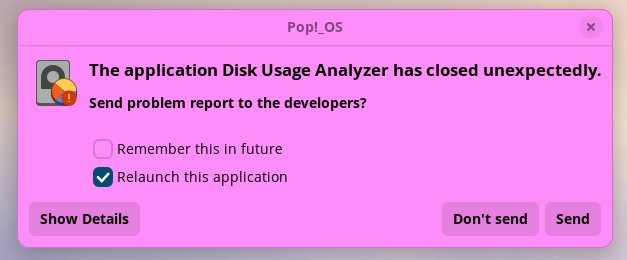
apport -p baobabThe baobab command is what runs the Disk Usage Analyzer in Pop!_OS.
 Jack Wallen/ZDNET
A pop-up will appear asking if you want to send the report, remember the choice in the future, and relaunch the application. The apport tool will automatically gather the information from /var/crash and add it to the report.
If apport isn’t installed on your machine, it can be installed with one of the following commands:
- sudo apt-get install apport-gtk on Debian/Ubuntu-based machines running a GNOME-based desktop.
- sudo apt-get install apport-kde on Debian/Ubuntu-based machines running KDE Plasma.
- sudo dnf install apport-gtk on Fedora-based machines running a GNOME-based desktop.
- sudo dnf install apport-kde on Fedora-based machines running KDE Plasma.
Also: How I built the writing app I needed in 2 hours for free – with Ollama and VS Code
Also, some Linux distributions/open-source software include websites where you can submit bug reports. For example, Fedora Linux has a nice document on filing bug reports. There’s also the Firefox/Mozilla Bugzilla tool, which has been around for a long time. Do note that you have to create an account to use Bugzilla (it’s free). If you find a bug in LibreOffice, you can use the official Documentation Foundation Bugzilla page to submit a report.
 Jack Wallen/ZDNET
Another very handy method of submitting bugs is to go to the app’s GitHub Issues page and file a new issue. You can do this with just about any open-source app. All you have to do is locate the app’s GitHub page, click on the Issues tab, and create a new issue.
Reporting software bugs is the easiest way you can help developers improve the applications they’ve created. It doesn’t matter how big or small the app is; the information you supply will be very helpful.

See full bio