Fake ChatGPT and Claude apps spread Yoba malware through GitHub, using signed executables to load a cryptominer on Windows PCs and support other payloads.
Attackers are distributing fake ChatGPT and Claude desktop applications through GitHub, packaging malware alongside genuine executables signed by OpenAI and Anthropic. The campaign came to light through research by Check Point, whose analysts observed cryptocurrency-mining software being installed on Windows computers through a loader capable of delivering other malware.
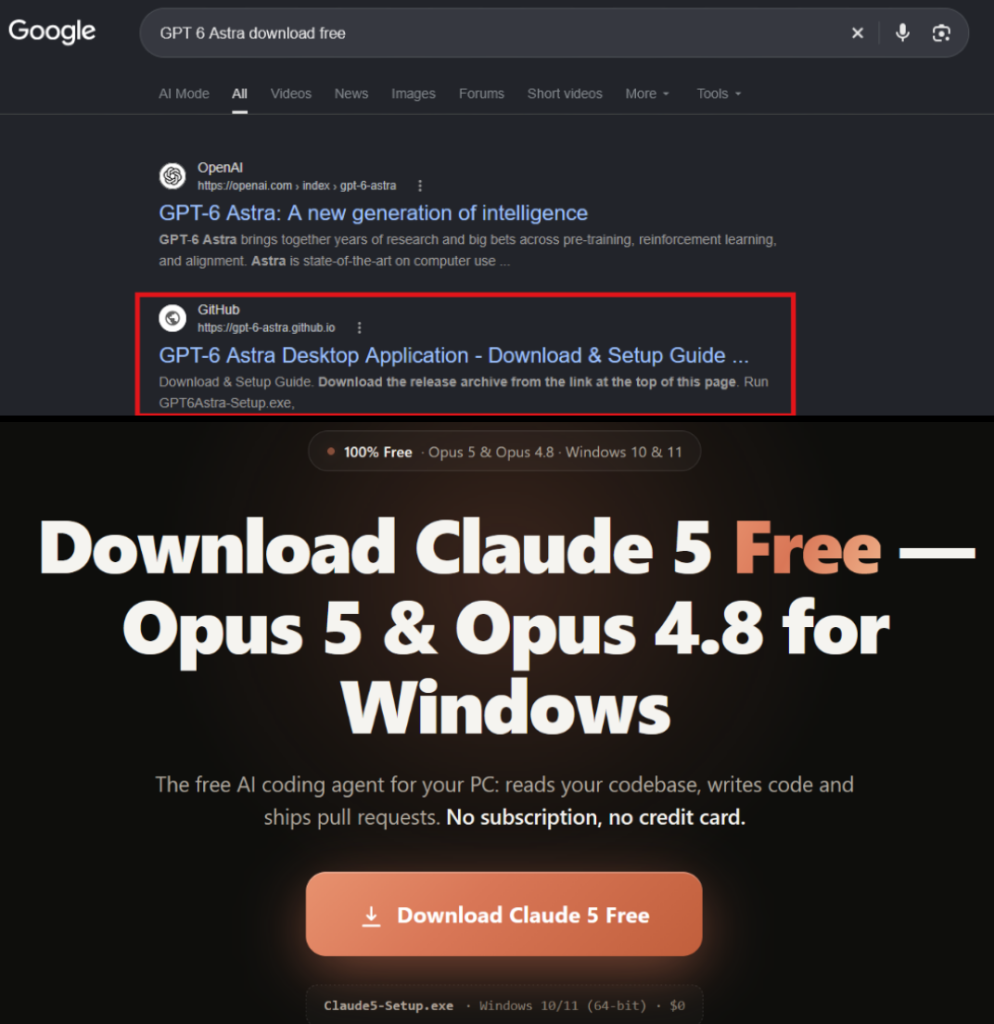
In its research, Check Point calls the campaign Yoba and describes fake GitHub projects offering supposed “GPT-5.6 Sol,” “GPT-6 Astra,” and “Claude Opus” desktop apps. The attackers bundled malware with genuine signed executables, without compromising OpenAI or Anthropic.
GitHub Pages Lead Users to Malicious Downloads
The attackers promoted the fake apps through GitHub project pages, including GitHub.io, that described their features and linked to ZIP downloads hosted on GitHub releases. Keeping both the promotional pages and downloads on a familiar platform helped the offers look credible to people searching for AI software.
Some of these pages appeared among the top Google results. Check Point found no signs of artificially inflated GitHub stars or forks, but said the wording and search visibility suggested the attackers had optimised the pages to attract users through Google.
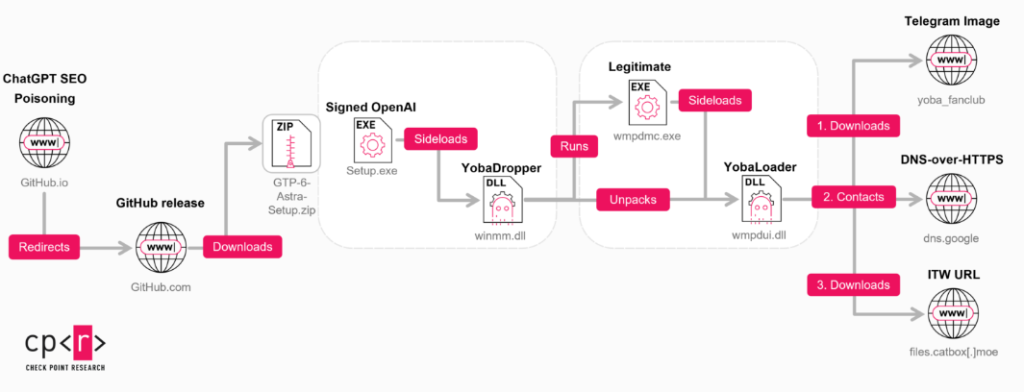
Anyone who downloaded and ran the package would launch a genuine, signed application executable. The attackers had placed a malicious file called winmm.dll beside it, which the application then loaded through a technique called DLL sideloading. Although the executable’s signature was valid, the file it loaded contained the malware.
Malware Demands Administrator Access
The malicious DLL, named YobaDropper by researchers, checks its execution environment before proceeding. Without administrator privileges, it displays a message requesting elevated access and exits.
It also excludes several keyboard languages, including Russian and Belarusian, while Ukrainian remains eligible. Keyboard settings are a filtering mechanism, however, and do not reliably identify a user’s location.
After installation, a scheduled task launches a copied Windows executable three minutes after startup. That program loads YobaLoader, allowing the infection to survive a restart.
A Telegram Image Helps Locate the Next Payload
According to Check Point’s detailed technical research, YobaLoader downloads a Telegram channel’s profile image and uses its final 50 bytes to generate a domain name. Changing the image lets the operator change that destination.
The loader then queries Google’s DNS-over-HTTPS service for instructions stored in a DNS TXT record. It verifies and decrypts those instructions before retrieving an encrypted payload, with Catbox used in the examined delivery chain.
Researchers observed XMRig cryptocurrency-mining software communicating through Tor. It can pause while someone uses the computer, reducing the chance that noticeable resource consumption alerts them. The loader also supports Windows executable and PowerShell payloads, so its capabilities are not limited to mining.
Signed Files Do Not Make an Unofficial Installer Safe
Check Point advises obtaining AI tools from verified sources and restricting execution of applications from unknown publishers or repositories. A familiar product name, a GitHub download page and a signed executable can all appear inside the same malicious package.
The campaign targets people choosing where to download AI tools. Checking that source before installation, particularly before granting administrator access, is the practical step users can take to avoid these counterfeit applications.