I don’t like Facebook, but I do like to buy and sell second-hand items. Unfortunately, Facebook Marketplace has become the most popular place to do this locally. For years, I’ve wanted a dedicated Android app only for Marketplace, and I finally figured out how to do it myself.
It’s no secret why Facebook hasn’t released a Marketplace app itself. Facebook wants you to watch Stories, scroll through ads, and get into arguments with your relatives. It doesn’t benefit as much if you’re only using it as an online garage sale. That’s precisely why I wanted to fully isolate Marketplace and block everything else.
Say “Hello” to Morphe Patches
A community of mods for Android apps

As I said, I’ve been dreaming of a Facebook app that does nothing but Marketplace for a long time. I’ve tried using deep-linking apps to put a shortcut directly to the Marketplace tab on my home screen, but they never work. My best solution has been to just use it in the browser, but a dedicated app would really be better.
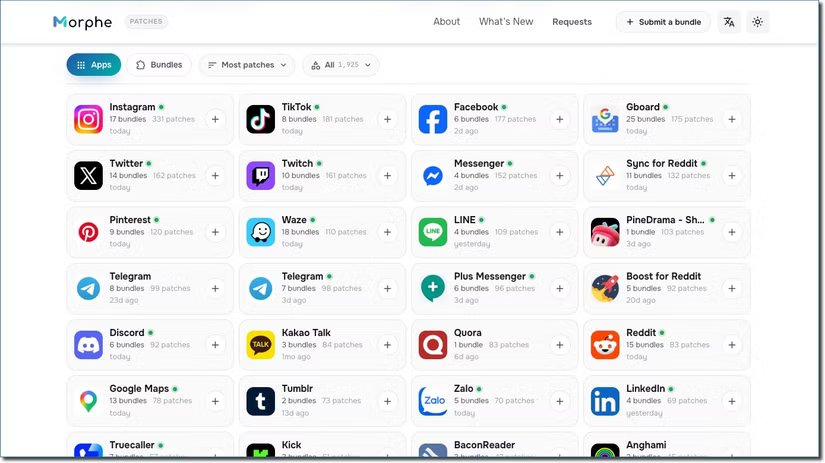
A few weeks ago, when looking for a more privacy-friendly version of Gboard, I stumbled upon a corner of the Android world that I’d never visited before. It’s called Morphe, and it’s a tool that allows you to apply powerful modifications to a huge number of Android apps. YouTube, YouTube Music, and Reddit are the big hitters, but Facebook is included as well.
Immediately after spotting Facebook in the list of apps, I looked to see if there were any Marketplace-specific mods. I was very happy to find exactly what I had been hoping for: a patch called “Marketplace only.”
Morph modifies apps with patches, and patches are usually part of a larger bundle. For example, the Facebook app currently has six bundles, which contain over 170 unique patches. The Marketplace patch is part of a bundle called “Hushfacebook.” It has over 130 of those patches by itself.
The cool thing about this system is the flexibility. You can use a bunch of patches to do a complete revamp of an app, or just fix one tiny thing that’s been bugging you for a while. It’s completely up to you.
Facebook Marketplace without Facebook
Let’s de-Facebook the Facebook app
The best way to learn about Morphe is to use it, so let’s go ahead and give it a shot. I’ll show you how I modified the Facebook app into a Marketplace app. The process is not difficult, but there are quite a few steps you’ll need to follow. The majority of this only needs to be done once.
- First, I went to the official Morphe website on my phone and downloaded the APK.
- After sideloading the APK, I opened it and tapped “More apps.” This opens the full list of patched apps in a browser tab.
- Find Facebook and select it. I did a search for “Marketplace” and found that Hushfacebook was the bundle I wanted, so I tapped “Add to Morphe.
- On the next screen, select “Open in Morphe,” then tap the “Add” button.
Now the Hushfacebook patches are ready to apply. Patches are designed for specific versions of apps, so the one already on your phone might not be supported yet. The app will guide you through installing the correct version for the patches. Before proceeding, I uninstalled the original Facebook app on my phone to avoid duplicates.
- I selected “Facebook” and then “Yes, help me find it.” Follow the instructions to download the APK from APKMirror, but don’t install it yet.
- After downloading the file, I went back to Morphe and selected “Open APK file.” Morphe will process it, add the patches, and then ask you to install the app. You’ll need to grant Morphe permission to install apps.
- When that was finished, I could open Facebook and sign in like normal. From there, I opened the regular Settings menu and went to the new “Hushfacebook settings” section.
- There’s a section in the settings specifically for Marketplace with a few handy options. But for a pure Marketplace experience, I went into the “Opening Facebook” section and enabled “Marketplace only.”
- From there, it was just a matter of restarting the app, and I was all done.
I’m so happy with this

Now, when I open the Facebook app, I’m immediately greeted with Marketplace listings. The toolbar at the bottom of the screen is free from extra junk. It’s clean, focused, and exactly what I wanted. Give it a try if you have a similar conundrum with using Facebook.