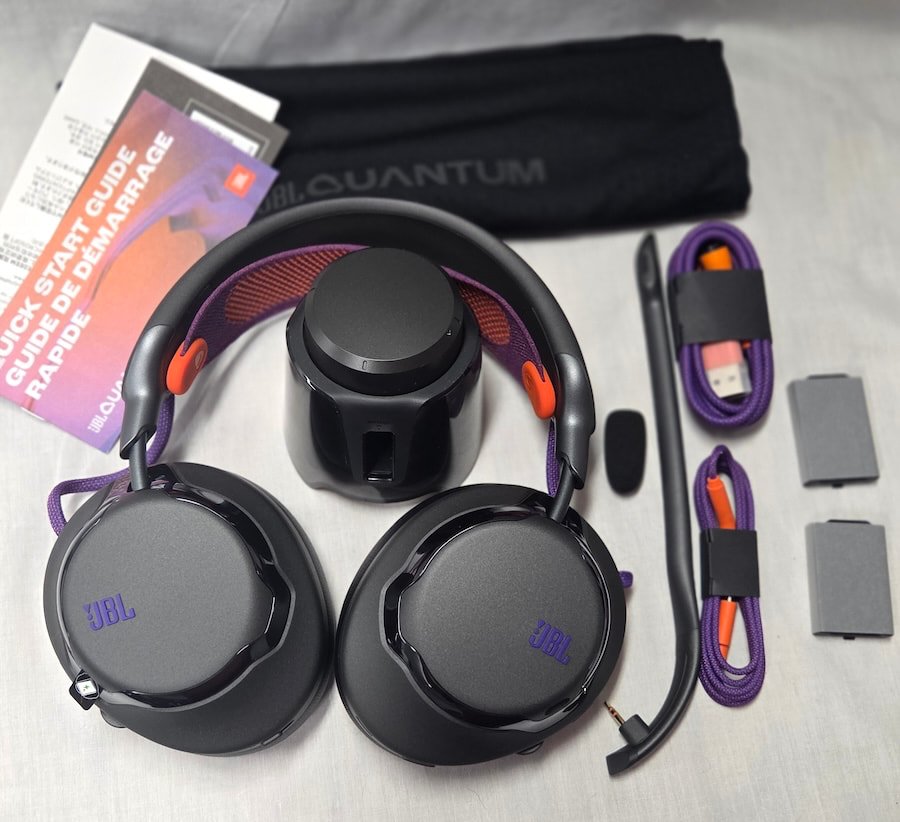
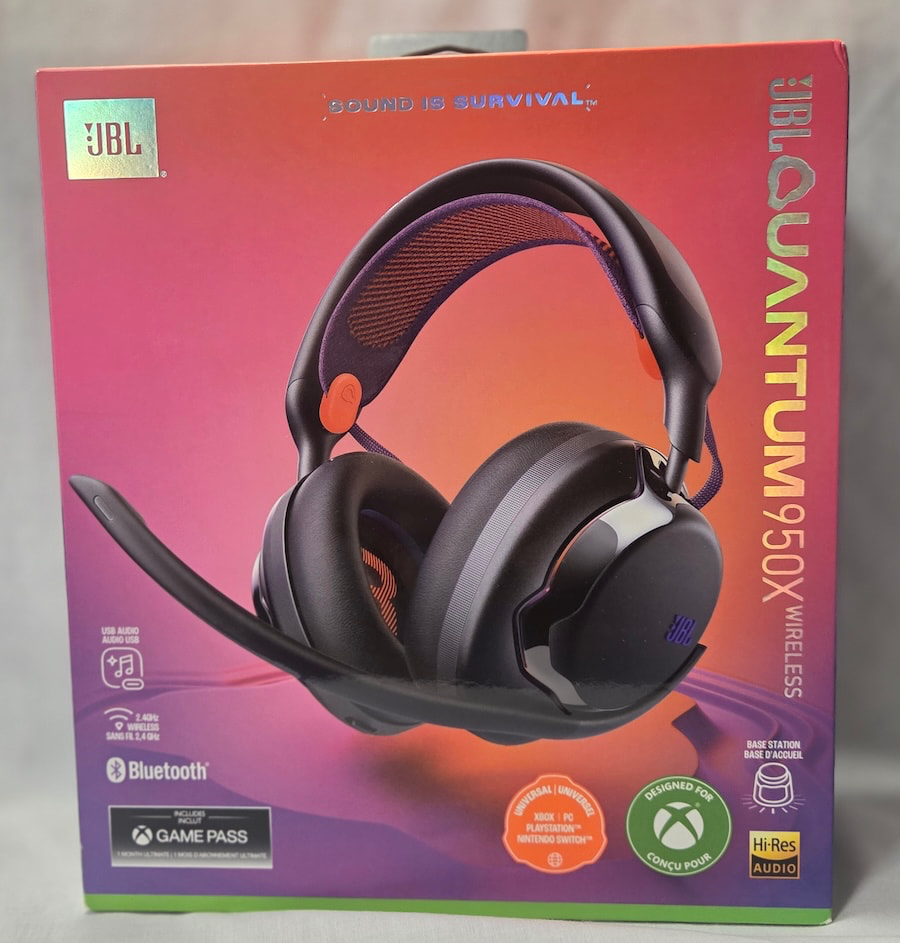
JBL has been building loudspeakers since the golden age of American hi-fi, when names like the L100, Hartsfield, and Paragon helped establish the company’s reputation for serious audio engineering. Today’s consumers are more likely to recognize JBL for its Flip, Charge, and PartyBox Bluetooth speakers or its Tour headphones, but the company hasn’t abandoned its high-performance roots. With the JBL Quantum 950X ($399.95), the American audio brand is making a stronger push into the premium wireless gaming headset market, where established competitors aren’t particularly interested in surrendering market share.
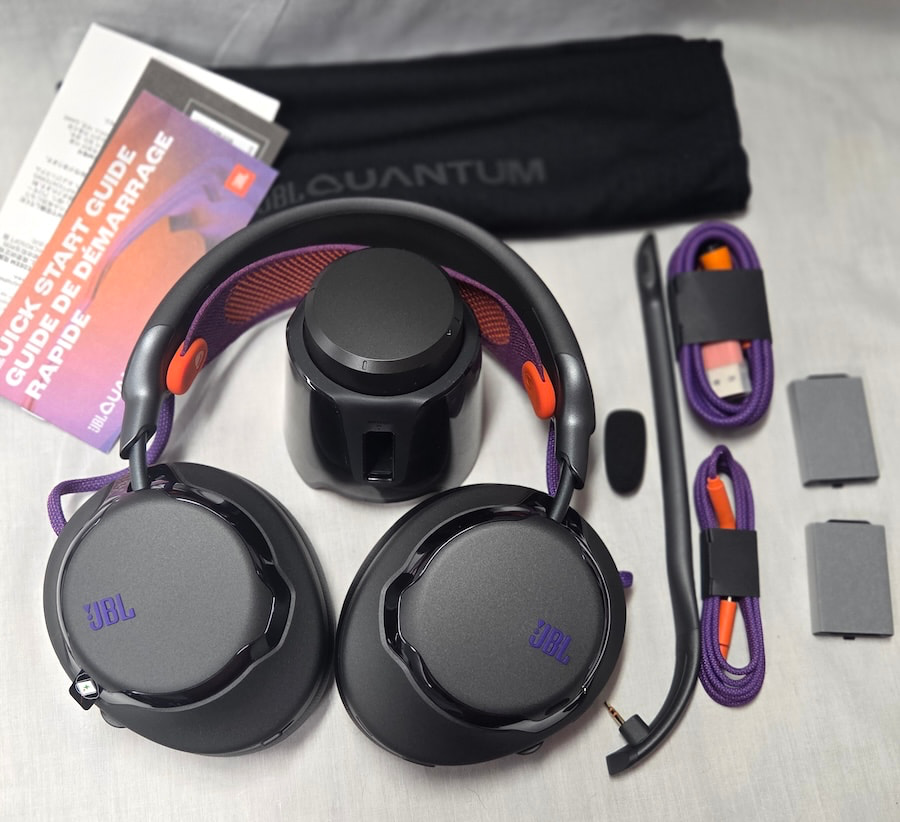
The Quantum 950X sits at the top of JBL’s gaming headset lineup, which stretches from the affordable $44.95 Quantum 100M2 to more sophisticated wired and wireless models for PCs and gaming consoles. Building on the earlier Quantum 910X, the new flagship introduces 50mm carbon-damped dynamic drivers, adaptive noise cancellation, head-tracked spatial audio, simultaneous 2.4GHz and Bluetooth connectivity, and a multifunction wireless base station. JBL has also incorporated a redesigned headband and user-replaceable batteries, addressing two practical concerns for gamers who spend considerably more time wearing headphones than most audiophiles would care to admit.
At this price, the Quantum 950X faces serious competition from the Audeze Maxwell 2, SteelSeries Arctis Nova Pro Wireless, and Sony INZONE H9 II, all of which bring their own strengths to gaming audio. JBL is also targeting users who want one headset for gaming, music, video calls, and everyday computer use rather than maintaining separate headphones for every activity.
The specifications suggest a capable all-rounder, but can JBL translate its decades of audio experience into a gaming headset that genuinely challenges the category’s established leaders? That’s what we’re here to find out.
Related Reading:
Replaceable Parts, Clever Controls, and a Headband That Needs Work
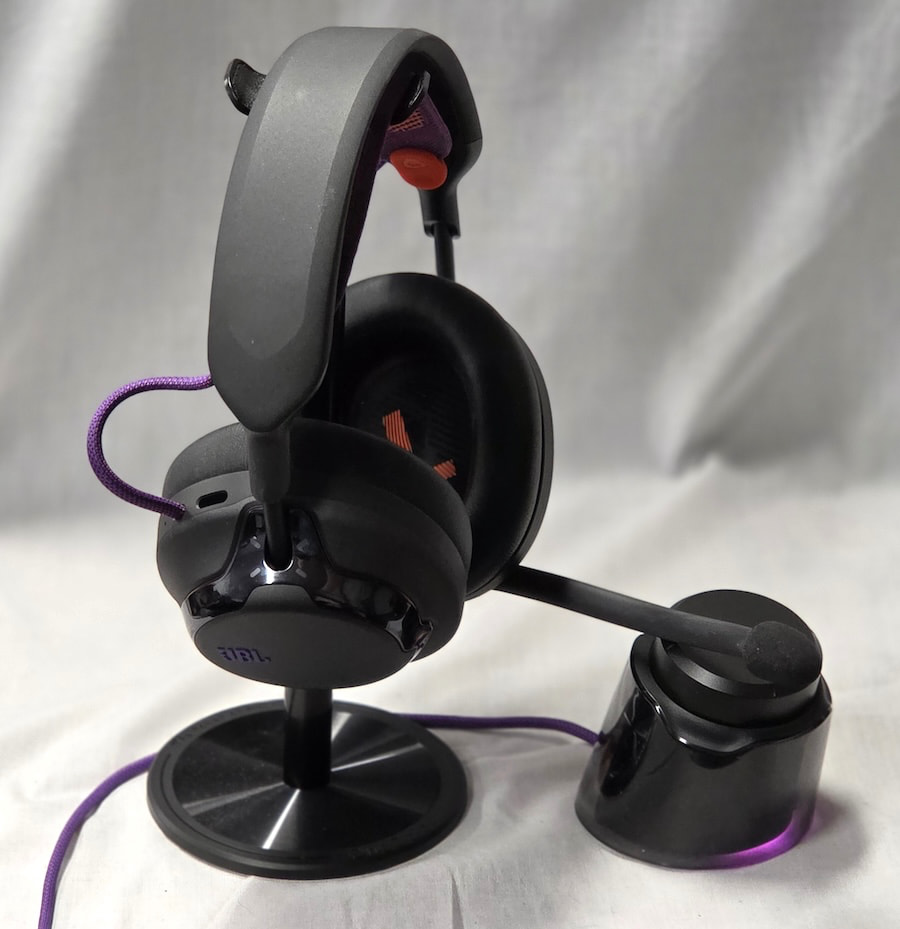
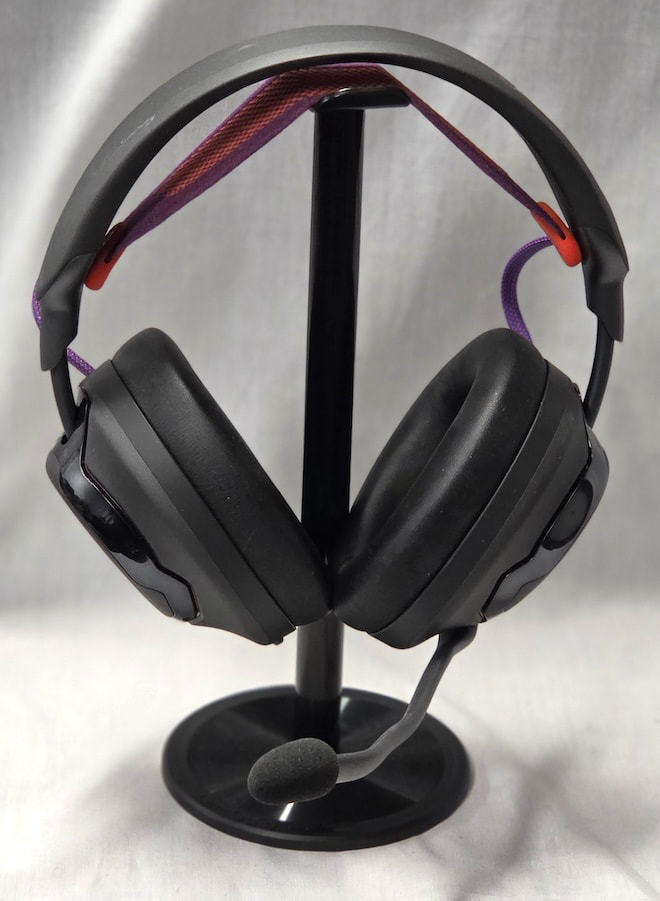
Like most gaming headsets, the JBL Quantum 950X uses a closed-back design with a removable boom microphone and a more youthful, energetic appearance than traditional audiophile headphones. Construction is primarily polymer, with a metal headband frame providing additional support. JBL uses a suspension strap to distribute the weight, but during my audition, the center of the headband still rested against the top of my head. That’s partly due to the headset’s weight and partly to the unusually stretchy suspension material, which doesn’t provide quite enough support. A firmer strap would likely improve comfort, particularly during extended gaming sessions.
Fortunately, the suspension is easily removable, attaching to the headband through a simple peg-and-slot arrangement. At 398 grams with the boom microphone attached and approximately 385 grams without it, the 950X is heavy enough that weight distribution becomes particularly important.
The earcups attach to the headband at a single point and offer approximately 15 degrees of lateral adjustment, along with 90 degrees of forward rotation and 40 degrees of rearward rotation. This allows the cups to fold flat for storage or transportation, while roughly an inch of vertical adjustment on each side accommodates a wide range of head sizes and shapes.
JBL includes a soft storage pouch to protect the headset when not in use, but anyone planning to travel with both the headphones and wireless base station would be better served by a more substantial protective case.
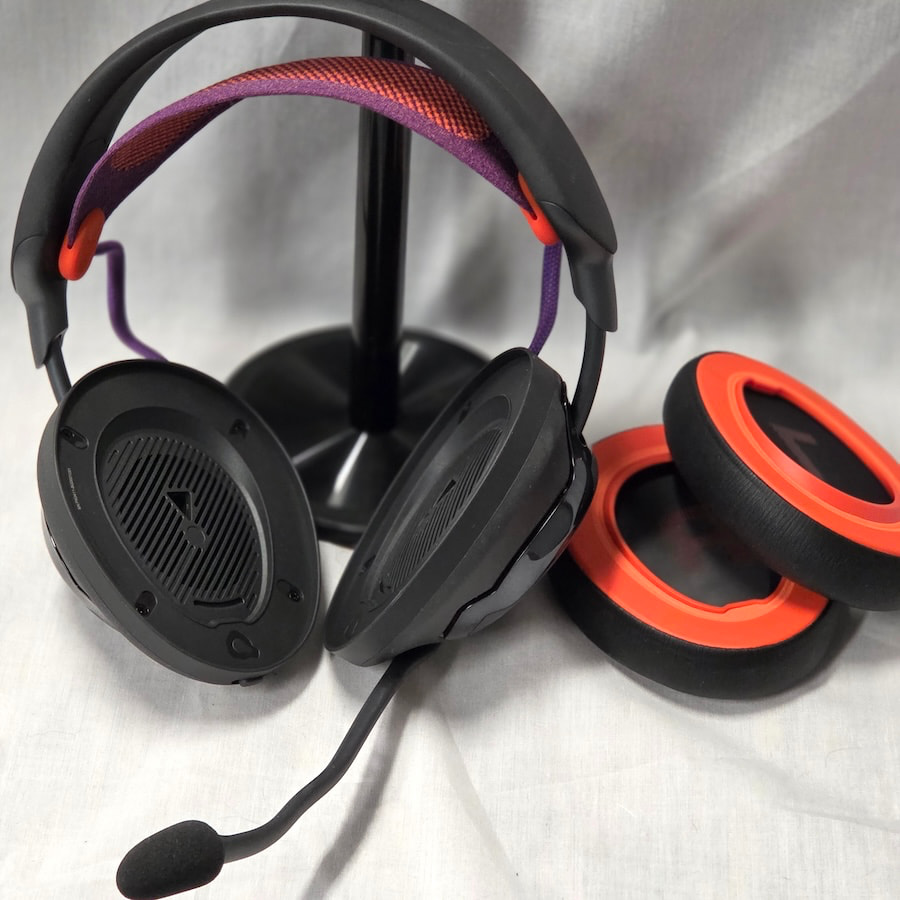
The earcups feature a stepped design, with faceplates approximately half an inch smaller than the surrounding housings on all sides. These covers attach magnetically and can be removed without tools, providing easy access to internal components. The right earcup houses the replaceable battery, while the left includes the microphone connection, which requires removing the boom microphone before taking off the cover.
It’s a thoughtful design that makes routine maintenance considerably easier than on many gaming headsets, where replacing a worn component can feel like preparation for open-heart surgery.
Physical controls are divided between the two earcups. The right side houses the power and Bluetooth pairing switch, game/chat balance dial, and spatial sound button, while the left side includes the USB-C connection, ANC/Ambient Aware button, volume dial, and microphone mute control. The arrangement provides direct access to frequently used functions without requiring players to interrupt their games or navigate another software menu.
The supplied wireless base station adds another layer of convenience, with a multifunction control knob for adjusting volume, muting the microphone, and balancing game audio against voice chat. It also provides a charging slot for the spare battery, making it possible to keep a replacement ready for extended gaming sessions.
Additional settings can be adjusted through JBL QuantumENGINE, available for Windows, macOS, Android, and iOS, although available features vary by platform. The application doesn’t run directly on gaming consoles, but certain settings configured beforehand can carry over when switching devices.
One of the Quantum 950X’s strongest design features is its emphasis on user-replaceable components. The batteries, earpads, microphone, earcup covers, and headband suspension can all be removed without specialized tools, making maintenance and replacement relatively straightforward.
That’s particularly welcome in a category where otherwise functional headsets are frequently discarded because a battery no longer holds a charge or an ear cushion has fallen apart. JBL deserves credit for making long-term ownership part of the design rather than treating the entire headset as disposable.
Carbon-Damped Drivers, Wireless Connectivity, and Swappable Batteries
The JBL Quantum 950X uses newly developed 50mm dynamic drivers with a carbon-based damping systemintended to reduce distortion and improve clarity compared with the previous generation. JBL’s marketing emphasizes the carbon material, which might lead some to assume the headset uses diamond-like carbon (DLC) diaphragms. That isn’t the case, and JBL hasn’t disclosed the exact diaphragm composition. The carbon damping is designed to control unwanted resonances rather than serve as the diaphragm itself.
Published specifications include a 32-ohm nominal impedance, 101dB/mW sensitivity at 1kHz, and a frequency response of 20Hz to 40kHz, although JBL doesn’t provide a tolerance for that frequency range. Since the 950X relies on internal electronics for operation, impedance and sensitivity are largely reference specifications rather than important considerations when selecting a source.
Connectivity comes in three forms: Bluetooth 5.3, low-latency 2.4GHz wireless through the supplied base station, and direct wired connections. The base station connects to the source through USB, while the headset can also connect directly using the supplied USB-C cable. JBL includes a USB-C-to-3.5mm cable for devices with conventional analog headphone outputs.
Direct USB-C audio provided access to 24-bit/96kHz playback during my testing, although JBL doesn’t specify a maximum sampling rate in its published specifications. Bluetooth connectivity is more limited, with SBC and AAC available during testing rather than the more advanced codecs offered by some competing wireless headphones. For those seeking the most reliable connection and highest available audio quality, USB-C remains the preferable option.
Wired operation also changes how the headset behaves. In my testing, connecting through USB disabled the wireless connections, while the headset’s volume dial controlled its internal audio level rather than automatically adjusting the source device’s system volume. JBL’s documentation also confirms that the microphone mute button and game/chat balance dial are unavailable during direct USB audio operation. These aren’t necessarily dealbreakers, but they’re worth understanding before switching between wireless gaming and wired listening.
The microphone connection on the left earcup is reserved for the supplied boom microphone or calibration microphone, not for a conventional analog audio input. The detachable boom microphone uses a 6mm cardioid capsule with a specified frequency response of 100Hz to 8kHz, concentrating on the vocal range rather than full-bandwidth recording.
JBL QuantumENGINE provides additional microphone processing, including environmental noise reduction and voice adjustments, which should help reduce unwanted keyboard noise and other distractions during gaming sessions. The software offers more flexibility than the physical controls alone, although the quality of the final result still depends on microphone positioning and the surrounding environment.
Power comes from a removable 700mAh lithium-ion battery installed beneath the right earcup’s magnetic cover. JBL includes two batteries, allowing one to operate the headset while the other charges in the base station. This arrangement makes considerably more sense than permanently sealing a rechargeable battery inside an expensive gaming headset and hoping it survives years of daily use.
The base station can also operate with compatible handheld consoles, tablets, and phones, but it draws power from the connected source. Charging a spare battery through the station can increase that demand, making it advisable to leave the spare battery out when using devices with limited battery capacity.
JBL specifies approximately three hours for a full battery charge, with up to 25 hours of playback using 2.4GHz wireless, 30 hours over Bluetooth, and 22 hours with both connections active. My results were reasonably close, averaging approximately 24 hours over 2.4GHz, 27 hours over Bluetooth, and 21 hours with both wireless connections enabled.
Actual battery life will vary with volume, noise cancellation, and other operating conditions. JBL also documents a quick-charge capability providing approximately one hour of playback from five minutes of charging through USB-C. With a fully charged spare battery available, however, swapping batteries remains the more practical solution for anyone unwilling to interrupt a gaming session. Direct USB-C operation can also charge the installed battery, eliminating battery-life concerns when connected to a suitable powered source.

Personalized Spatial Audio, QuantumENGINE, and Adaptive Noise Cancellation
The JBL Quantum 950X supports Quantum Spatial Sound with head tracking, taking things a step further with personalized calibration. JBL includes a small calibration microphone that connects to the boom microphone port and is positioned inside the listener’s left ear before putting on the headset. The process requires a PC, the wireless base station, and JBL QuantumENGINE software, which runs a series of test signals to adjust the spatial processing to the listener’s hearing characteristics. Setup takes approximately five minutes, although the actual measurements require only about 30 seconds. Calibration can be repeated for different listeners, but there’s no convenient way to save and switch between individual profiles.
In my testing, the spatial processing produced a noticeably wider soundstage with some additional depth, although the improvements came with compromises. Bass output was slightly reduced, and certain recordings exhibited an artificial reverberation that wasn’t present with spatial processing disabled. Interestingly, the effect was consistent with specific tracks rather than occurring randomly, suggesting an interaction between the processing algorithms and particular recordings. Most music avoided the problem, but when it appeared, it was difficult to ignore.
QuantumENGINE also provides preset sound profiles, customizable EQ, audio visualization, microphone optimization, voice effects, and control over the base station’s lighting. I still recommend using the supplied microphone windscreen to minimize plosives, regardless of the software’s processing capabilities. Firmware updates are handled through the application, although the process proved less straightforward than expected. During testing, the base station required an update before the headset recognized that its own firmware needed attention, resulting in two separate installations before the components were synchronized. It worked, but there’s certainly room for JBL to streamline the process.
The 950X also includes adaptive active noise cancellation (ANC) and JBL’s TalkThru feature for hearing conversations without removing the headset. ANC performance was respectable but hardly class-leading, proving most effective against steady, low-frequency background noise while struggling with higher-frequency sounds and sudden disturbances. It reduced distractions sufficiently for gaming, but listeners expecting the isolation provided by flagship Sony or Bose noise-cancelling headphones will be disappointed. The 950X prioritizes gaming functionality over absolute isolation, and its noise cancellation is best considered a useful addition rather than a reason to buy it.
JBL Quantum 950X Platform Compatibility
JBL advertises the Quantum 950X as compatible with Windows PCs, Macs, Xbox, PlayStation, Nintendo Switch, and mobile devices, but that doesn’t mean every feature works across every platform or connection type. Firmware updates and advanced customization require the QuantumENGINE software or companion app on a supported computer or mobile device, since the application isn’t available directly on gaming consoles. During my testing, spatial audio worked on PC but not on the PS5 or Nintendo Switch, despite JBL listing spatial audio support for those consoles. Xbox connectivity worked over USB-C, but I couldn’t establish a connection using the supplied USB-C-to-USB-A adapter.
These results may reflect differences in firmware, system software, or connection methods rather than universal compatibility limitations. I can’t guarantee that every device I tested was running the latest firmware, but the experience reinforces an important distinction between basic audio compatibility and full feature support. If personalized spatial audio or a particular connection method is essential to your gaming setup, verify compatibility before purchasing.
Listening
Like many gaming headsets, the JBL Quantum 950X favors a V-shaped sound signature rather than a neutral, reference-oriented presentation, with elevated mid-bass and upper-midrange/treble energy. Sub-bass is present but rolls off below approximately 40Hz, making it less prominent than the substantial mid-bass boost between 100Hz and 225Hz. That emphasis adds weight and impact to explosions, crashes, and other effects common in action games, although the bass can sound somewhat loose, with noticeable bloom extending into the lower midrange. It’s a tuning clearly intended to make gaming exciting rather than satisfy listeners seeking absolute tonal accuracy.
Lower-midrange frequencies retain good weight, but the elevated bass occasionally muddies deeper vocals and instruments. The central midrange is cleaner and slightly leaner, allowing higher-pitched voices to cut through the mix, which is particularly useful when trying to hear teammates over the chaos of multiplayer gaming. Upper-midrange and lower-treble emphasis gives the 950X a distinctly bright character, although the response drops relatively quickly above 7kHz, preventing most recordings from becoming excessively harsh.
Percussion has good snap, but cymbals occasionally sound tizzy or overly clicky, and there’s limited sparkle and air at the very top. Hotly mastered recordings can also become fatiguing during extended listening sessions.
Fortunately, QuantumENGINE’s 10-band equalizer provides meaningful control over the sound signature, with relatively small adjustments producing audible improvements. I was able to reduce the mid-bass emphasis and bring the overall balance considerably closer to neutral, transforming the 950X into a capable headset for music, work, and general listening. The underlying drivers have enough resolution and flexibility to deliver a more balanced presentation than JBL’s default gaming-focused tuning suggests, which makes the EQ particularly worthwhile.
Soundstage performance depends heavily on the spatial processing settings, with the 3D mode producing substantially greater width and some additional depth. Instrument separation is good, although not class-leading, and positional cues were convincing during my gaming sessions, with sounds appearing at appropriate angles and heights. That’s particularly important in competitive games, where accurately locating an opponent can mean the difference between surviving an encounter and looking two buildings in the wrong direction.
On the PS5, combining the console’s native Tempest 3D Audio processing with additional spatial effects introduced audible artifacts and degraded sound quality, making it preferable to use one processing system at a time. Rapid side-to-side head movements also occasionally produced an unnatural echo with head tracking enabled, suggesting JBL still has some refinement to do with its spatial algorithms.
The Bottom Line
The JBL Quantum 950X is an ambitious wireless gaming headset whose greatest strength is its versatility. Simultaneous 2.4GHz wireless and Bluetooth connectivity makes switching between gaming and phone calls convenient, while the multifunction base station, swappable batteries, and user-replaceable components give it a practical advantage over many competitors. JBL deserves credit for designing a headset that can be maintained rather than discarded, although its substantial weight and less-than-ideal headband suspension mean your neck may demand a break long before the battery does.
The default V-shaped tuning favors gaming over critical listening, with elevated mid-bass and occasionally aggressive treble, but QuantumENGINE’s effective 10-band EQ makes the 950X considerably more versatile for music and everyday use. Spatial audio adds useful immersion, although inconsistent platform compatibility and occasional processing artifacts remain frustrations. The 950X makes the most sense for gamers who will take advantage of its extensive features and want one headset for gaming, work, and entertainment. Just verify that your preferred features work with your console before buying, because JBL’s definition of compatibility doesn’t always mean everything works everywhere.
Pros:
- Simultaneous 2.4GHz gaming audio and Bluetooth
- Base station with controls and spare-battery charging
- Two replaceable 700mAh batteries
- Head-tracked JBL Quantum Spatial Sound
- Detachable 6mm cardioid boom microphone
- Replaceable pads, hammock, cable, mic, and batteries
- USB-C wired audio and included USB-C-to-AUX cable
- EQ maybe?
Cons:
- Heavy and potentially fatiguing.
- Bright signature with limited bass
- Bass boost gets wooly
- ANC and microphone are average at best
- Spatial processing has a reverb effect at times
- Feature availability varies by platform and connection
Our Ratings:
★★★★★★★★★★ Sound Quality
★★★★★★★★★★ Build Quality
★★★★★★★★★★ Comfort
★★★★★★★★★★ Usability
★★★★★★★★★★ ANC
★★★★★★★★★★ Value