Recently, I’ve seen people praising Rambler, a Pixel 11-exclusive AI feature built into Gboard. It can strip out fillers like “ums” and “ahs” and self-correct when you say something like “5 pm, sorry, 6 pm.”
As appealing as it is, spending $800+ on a smartphone for this single feature is the last thing I’d want to do.
I did some digging and figured that I didn’t even need a Pixel, let alone a Pixel 11, for dictation that cleans up my rambling dictation. For the past few weeks, I’ve been using Wispr Flow, and I’ve almost stopped typing on my Android.
Rambler’s best trick works on any Android phone
No Pixel 11, no Gemini, no problem

Gboard has had voice typing for a while, but the feature was far from perfect. The unique appeal of Rambler is that it can automatically remove filler words, correct your language, and give you a polished version of what you spoke.
Turns out, Wispr Flow has been doing almost the same for a long while now.
Wispr Flow is an AI-powered voice-to-text application from Wispr AI, available for Android, iOS, Windows, and macOS. It allows you to transcribe your speech and insert the text into any field on your smartphone or computer.

- OS
-
Windows, macOS, Android, iOS
- Price model
-
Freemium
Real-time polishing is one major feature built into Wispr Flow. This AI-powered app runs your transcribed speech through a model to remove filler elements, correct grammar errors, add punctuation, and even format it.
Wispr Flow offers a free plan that gives you 1,500 words per week. You can upgrade to the Pro version for unlimited words and additional features across devices.
Unlike Rambler, Wispr Flow doesn’t need a Pixel 11 series smartphone or Gemini. Any Android smartphone will do. And after trying what Wispr Flow has to offer, I’m a real convert.
I talk to my phone more than I type on it now
My thumbs are on extended sabbatical
If you’ve ever tried to send a professional email or a lengthy text from your smartphone, you’d know how annoying most Android keyboards are. It’s not that you can’t type. But you do it at terrible speeds — somewhere under 40 words per minute — and trade accuracy while at it.
Wispr Flow fixes both these issues.
More importantly, Wispr Flow doesn’t want me to use a specific Android keyboard. Instead, the tool uses an accessibility setting to display a small button on the side of your screen. You can tap this button, speak, and tap it again after you’re done. In a few seconds, Wispr Flow will paste the transcription into the selected text field.
As far as typing speed using Wispr Flow is concerned, it depends on how quickly you can speak. I comfortably hit a speed of 150 words per minute, and it means I can compose lengthy emails or detailed AI prompts from the convenience of my Android.
Moreover, unlike Gboard voice typing, it corrects most grammar and punctuation errors, so I spend less time editing what I’ve written.
It doesn’t want me to stick to one style, either
You need different tones in different places
Even the free version of this app gives me some cool customization features. For instance, I get to choose among styles such as very casual, casual, and formal. The best part? I can set up specific personal styles for app categories like Personal, Work, Email, and Other.
That way, I can say the same thing using the button, but it will change capitalization and punctuation depending on which app I have open. I don’t have to worry about how I’m saying things every time I switch apps.
I’ve also found that Wispr Flow can recognize the type of content you’re dictating and format it accordingly. For instance, when I’m typing an email message, it knows how to separate the salutation from multiple body paragraphs. In the same way, when I list a few things, it automatically adds bullets or numbers.
You can extend this further with custom words in Dictionary and setting up snippets. For instance, I can set up a snippet for my address. From this point, whenever I say “my address,” Wispr Flow will insert the actual address. It’s been pretty handy to insert links and other forms of text across devices.
Overall, I’ve reached a point where I tap this single button and say what I need to type more than I actually type.
Wispr Flow isn’t the only way to type using your voice
Pick your mouthpiece, Pixel optional
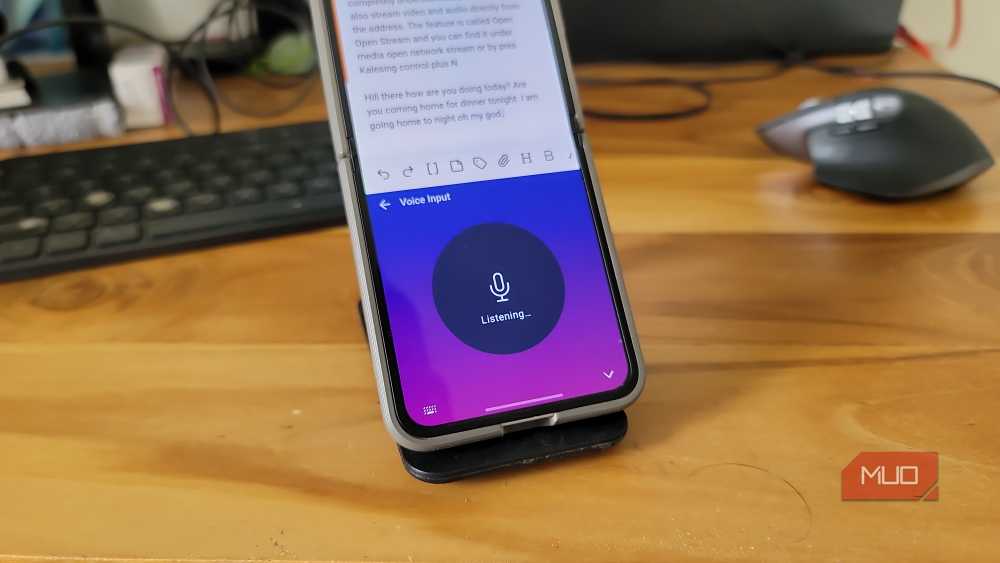
In the end, Wispr Flow’s free plan caps at 1,500 words per week, and it requires an internet connection to transcribe voice to text. Then again, you don’t necessarily need Wispr Flow to skip Rambler. Instead, you can choose one of the many other options.
If you want something local that works even when Wi-Fi doesn’t, you have two options. One option is FUTO Keyboard, one of the best Android keyboards out there. Another choice is Microsoft’s SwiftKey Keyboard, which also offers offline voice typing that works reasonably well.
Ultimately, most of these apps work on many different Android devices, and you can use voice-to-text without relying on Google or Pixel.
Where Rambler and Gboard still beat Wispr Flow
As you’ve seen, Wispr Flow has helped me almost stop typing on Android. This free-to-use app has been a great companion for my Android experience. Nevertheless, the Rambler + Gboard duo may outperform Wispr Flow in some areas, such as in-line AI edits and offline support for basic cleanup. However, if you ask me, those are limitations you can live with, since you don’t have to buy a new phone to access solid dictation.