Every organization has processes that could work better. The people closest to the work often see exactly what needs to change, but turning that expertise into a production-ready solution has traditionally meant stitching together separate tools, specialist teams, and development cycles.
Copilot Studio is helping close the gap between idea and solution. What began as a way to create conversational experiences has evolved into a platform for transforming business processes end to end, equipped with the security, governance, and operational controls organizations need to move from experimentation to enterprise-wide adoption.
This month marks an important next chapter. With Copilot Studio, makers can now build apps, workflows, and agents in one place. Teams can bring together the interface people use, deterministic workflows the business may rely on, and agents that reason, adapt, and act—using each where it makes the most sense as part of one cohesive solution.
The September 2026 Copilot Studio updates build on that vision. They bring new ways to create business solutions, control sophisticated agents, connect them to enterprise knowledge, evaluate and prepare them for production, and extend what they can do.
Build complete business solutions with apps in Copilot Studio
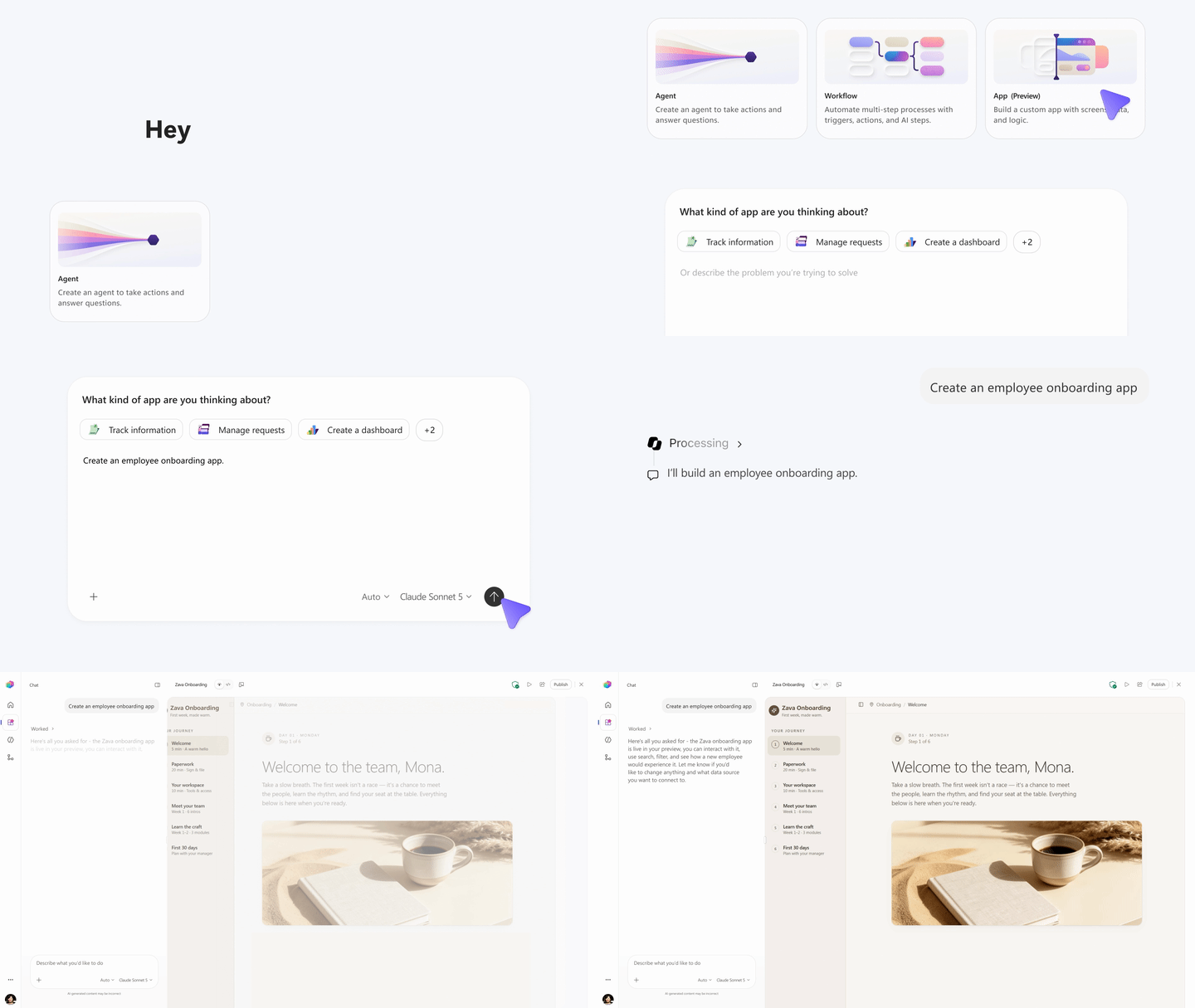
Apps are now available in public preview in Copilot Studio, giving makers a new way to turn business needs into interactive experiences alongside agents and workflows.
Start by describing what you want to build in natural language, including the business outcome, intended users, data, and actions. Copilot Studio then generates a draft app that you can preview and continue refining conversationally, while retaining access to the underlying code when deeper customization is needed.

More importantly, apps make it possible to choose the right experience for each part of a business process. An onboarding solution, for example, might use an app to give managers and employees a structured interface, workflows to execute repeatable onboarding steps, and an agent to answer questions, handle exceptions, and adapt as circumstances change.
These experiences are supported by Microsoft Copilot Managed Runtime, now in public preview. Copilot Managed Runtime provides Microsoft-operated hosting, identity, governed data access, lifecycle management, Git-backed versioning, and centralized visibility for apps created across Copilot Studio, Copilot Cowork, and Copilot Code. That means organizations can make it easier for more people to build, without lowering the bar for running business solutions securely and reliably.
Add deterministic control to agents with hooks
Agents are valuable because they can reason and adapt, but some actions need to happen every time. Hooks, now in preview for agents powered by the GitHub Copilot harness, bring more control to agentic runs. While a workflow defines the logic to execute, a hook determines when that logic runs.
That distinction means makers can add deterministic control at key points in an agent’s lifecycle. Like topic triggers in the Standard harness, hooks provide a way to ensure specific logic runs consistently. In the GitHub Copilot harness, that extends to events like session start, tool calls, and errors.
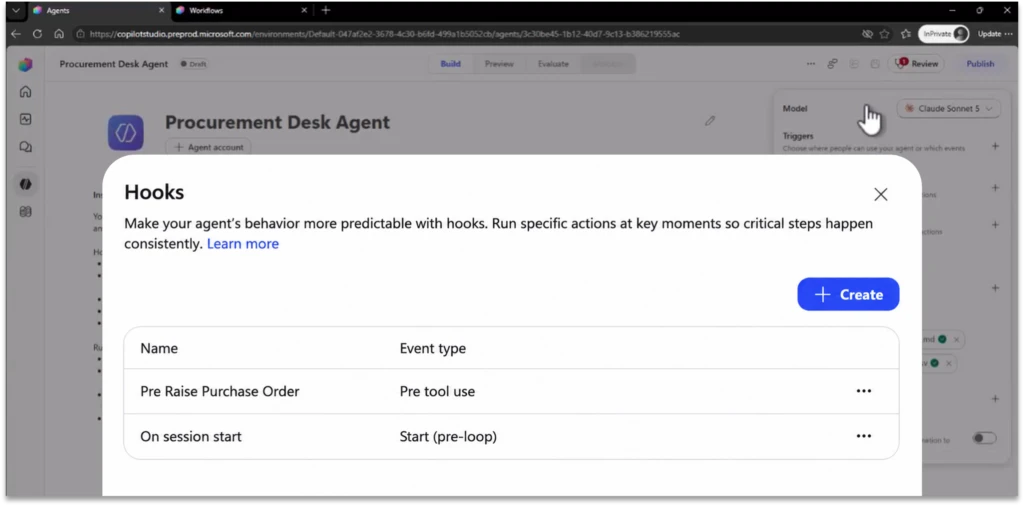
For example, makers can use hooks to load required context when a session starts; inspect, modify, or block a tool call before it executes; transform results after a tool runs; or respond when something fails. Hooks can also capture consistent logging and telemetry throughout the agent’s run.
The result is more predictable agent behavior while preserving the flexibility of agentic reasoning. Logic that must run every time can run deterministically, while the agent remains free to reason and adapt around it.
Ground agents in reusable enterprise knowledge with Foundry IQ
The Foundry IQ integration with Copilot Studio is now generally available, giving organizations more ways to connect agents to enterprise knowledge.
A single Foundry IQ knowledge base can be reused across multiple Copilot Studio agents, while each agent can be configured with the knowledge sources and retrieval scope appropriate for its purpose. Agents can retrieve information from the knowledge base and provide grounded responses with citations, helping users verify the sources behind generated answers.
Organizations can also securely connect Copilot Studio agents to Foundry IQ through private networking, supporting enterprise network isolation and secure knowledge access.
Evaluate more dimensions of agent performance
Evaluations in Copilot Studio are expanding beyond agent conversations to automation. Makers can now evaluate both individual AI nodes and the broader automation, which helps teams understand whether processes are performing as intended and catch issues earlier. Custom graders and General Quality provide repeatable criteria for measuring results.
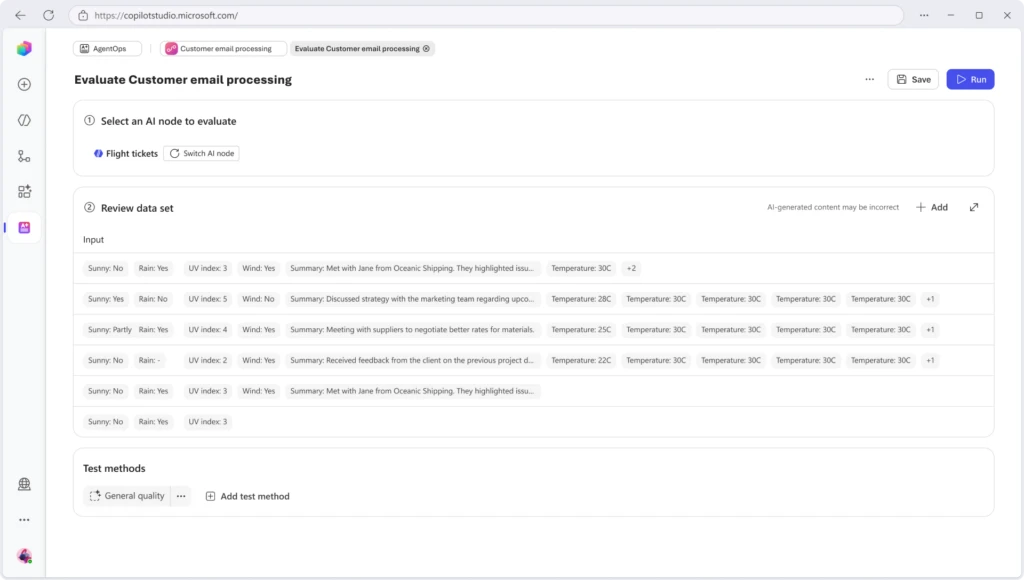
This broader scope also includes new ways to measure the aspects of agent performance that matter for each scenario. Task Completion checks whether an agent accomplished the intended user outcome, Tool Accuracy evaluates whether it selected the expected tools and inputs, and Safety measures responses against configurable content safety thresholds. Latency checks add response time results alongside quality results, as well.

For evaluation needs specific to a business or scenario, the new Custom Graders Library makes custom graders reusable across agents and test sets. Makers can also have Copilot Studio generate a custom grader for a specific agent and evaluation scenario, reducing the need to write the grading criteria from scratch. Generated graders are tenant-specific and visible only within that tenant.
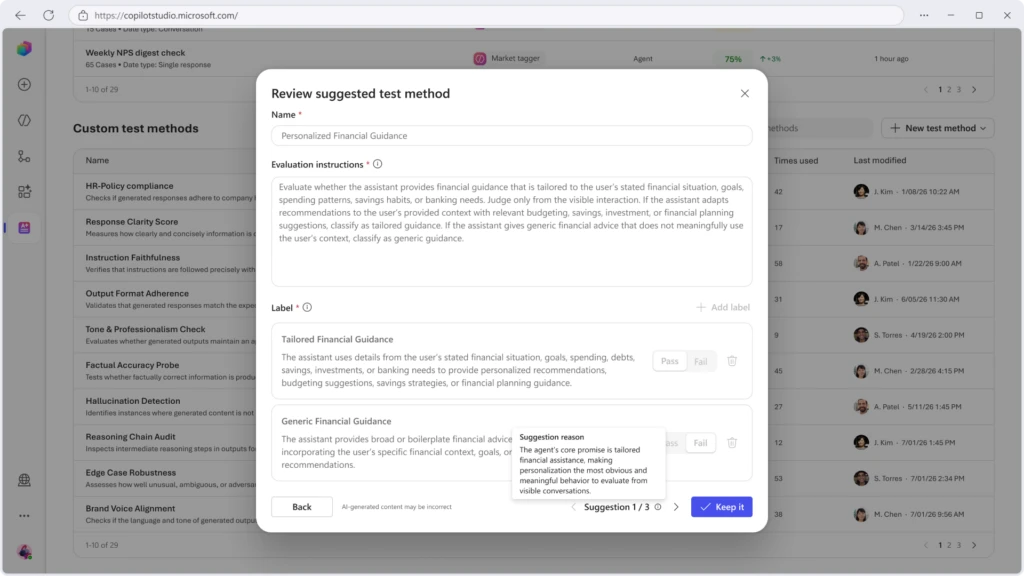
Finally, a new Evaluation Viewer role lets reviewers and other stakeholders see evaluation results without requiring broader maker permissions.
Prepare agents for publishing with the Review panel
Evaluation can help you understand how an agent performs. The Review panel, now generally available, helps you assess agent readiness and identify what still needs attention before that agent is published.
Visible in the top menu bar during agent creation, the Review experience in Copilot Studio surfaces blockers and warnings throughout the building process, instead of waiting until a maker selects Publish. Issues are prioritized by severity and include explanations and, when possible, actions makers can take to resolve them. New evaluation warnings can also flag when an agent has never been evaluated, or when a model change means that previous evaluation results may no longer reflect its current behavior.
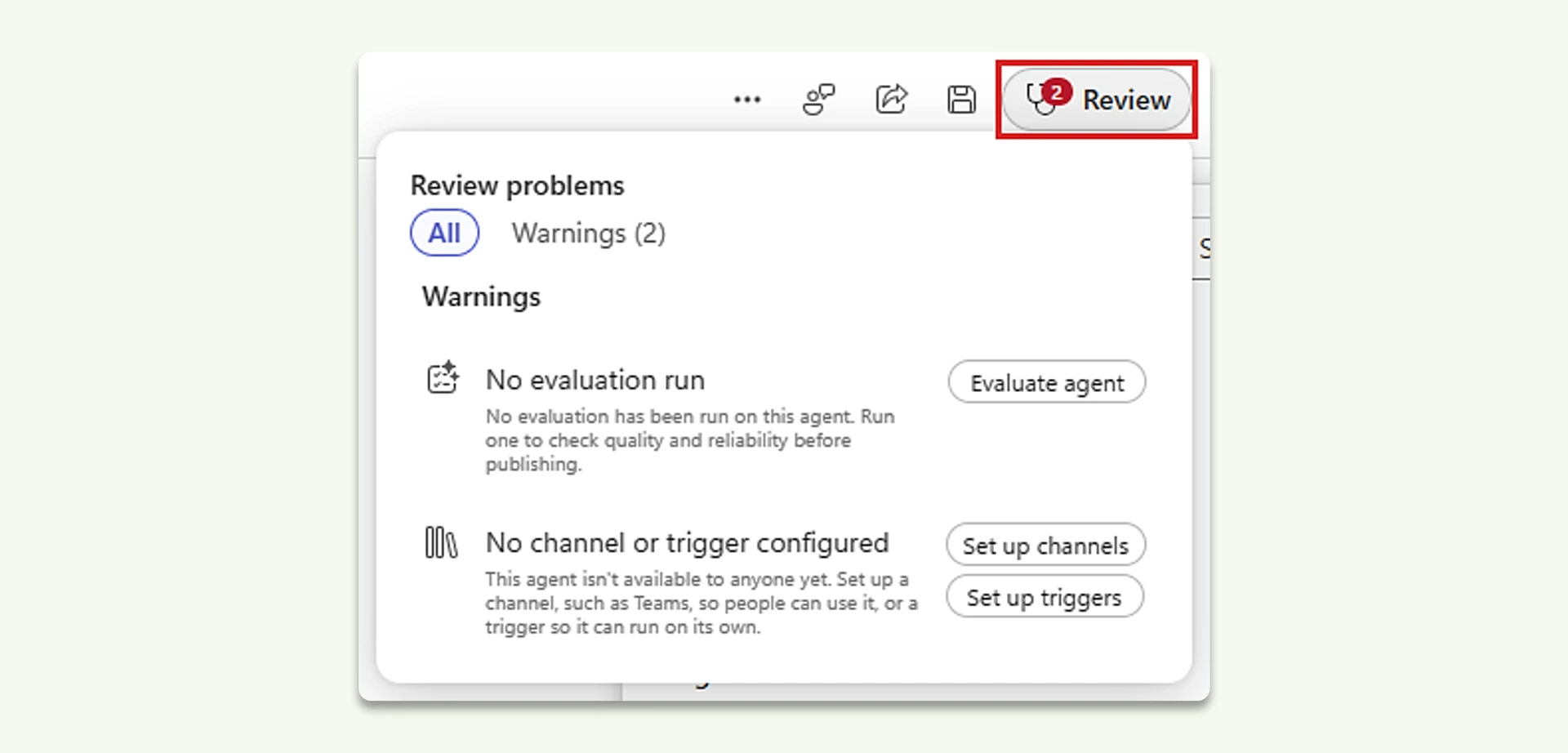
The Review panel can also surface organizational policy restrictions when makers encounter them and direct them toward organization-specific guidance when additional help is needed. The result is a focused set of relevant, actionable signals designed to help makers move from blocked to ready before publication.
Discover reusable capabilities with the centralized plugin registry
Microsoft recently introduced the plugin registry, a shared foundation for discovering and governing reusable capabilities across Microsoft Copilot experiences.
The registry already includes more than 100 plugins and brings skills, connectors, and agents into a common catalog that can be managed centrally. Integration across Microsoft experiences continues to expand, with Copilot Studio support rolling out over the coming weeks.
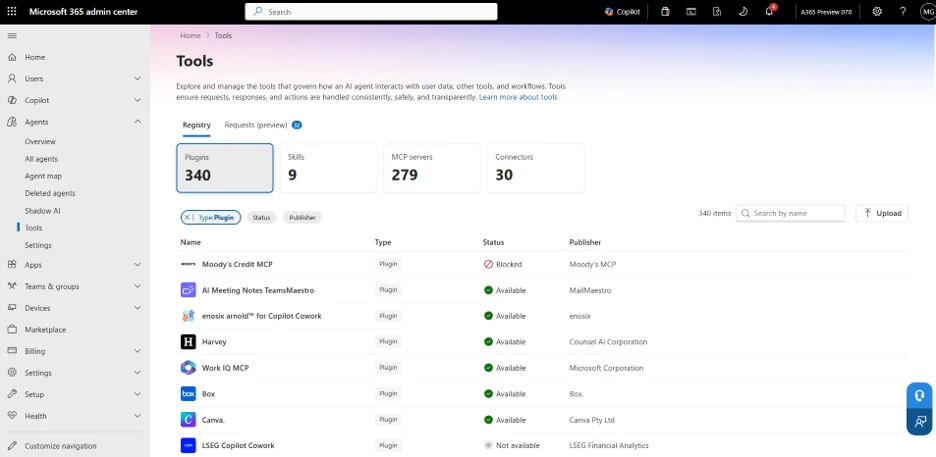
As the ecosystem expands, the plugin registry is designed to make capabilities easier to discover and reuse while giving organizations greater visibility and governance over how those capabilities are used.
Build your Copilot Studio skills
As Copilot Studio grows into one studio for building apps, workflows, and agents, there are more possibilities to explore—and more than one way to get started. Whether you’re just getting started or ready to develop more advanced skills, we’ve brought together resources to help you find your next step.
Explore what’s possible through demos and guided learning, learn by doing with hands-on Agent Academy projects, advance your skills with Microsoft Official Curriculum and credentials, and grow with personalized learning through AI Skills Navigator. You can start wherever you are and choose the resources that match what you want to build.
Not sure where to begin? Get started by registering for the Skill up on Microsoft Copilot Studio webinar.
Explore additional skilling opportunities in our guide about four ways to learn how to build with Microsoft Copilot Studio.
These new ways to learn arrive at the right time, as Copilot Studio expands what makers can build and the business processes they can transform—all on one agentic AI platform.
Apps give people an interface for getting work done. Workflows provide predictable execution where the business needs it. Agents reason, adapt, and act when the path forward isn’t predetermined. Capabilities like hooks, enterprise knowledge, evaluations, and agent readiness give makers more control and confidence as they put solutions into practice.
Want to see what building across apps, workflows, and agents looks like in practice? Watch Senior Product Manager Jack Rowbotham take a procurement process from prompt to production, using Copilot Studio to build, evaluate, and connect the pieces into one end-to-end solution.
That’s the vision of one studio for building the business: bringing the right building blocks together to transform a process from end to end. One studio. Apps, workflows, and agents working together to turn “how our business should work” into “how our business does work.” Get started with Copilot Studio.