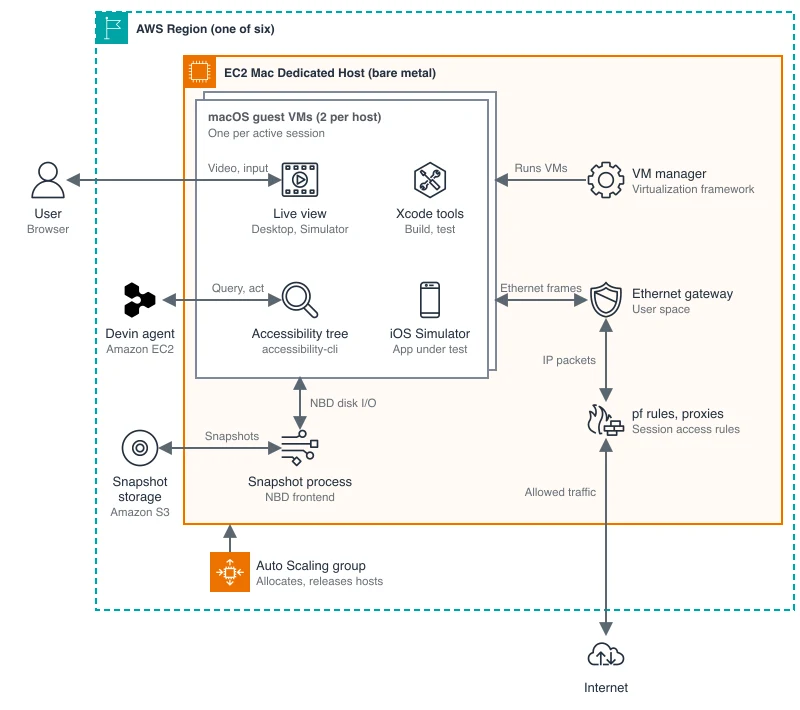
Devin’s Apple-app work now has a cloud Mac behind it—not just an agent writing code and waiting for someone else to test it. In a November 19 architecture post, AWS detailed Cognition’s setup across six cloud regions. Cognition says nearly 1,000 organizations were running Devin on macOS within six weeks of launch.
The disclosure explains the infrastructure behind macOS support launched on September 15, 2026. Before that release, Devin Cloud sessions ran on Linux and Windows. They could write Swift code, but needed a customer’s automated build system or Mac fleet to build and test Apple apps.
Sharing Macs without losing the work
Cognition rents physical Apple computers through Amazon EC2 Mac, rather than buying and maintaining its own fleet. Each host runs two isolated macOS virtual machines—separate software environments for active Devin sessions. AWS attributes that ceiling to macOS licensing limits. The underlying dedicated host has a minimum allocation period of 24 hours.
That makes the distinction between a session and its machine important. When a session goes idle, Cognition can release its virtual machine while keeping its disk state in a snapshot. A session can free and reclaim a machine several times, leaving the host available for active work instead of tying it to one unfinished task.
A separate storage process handles disk reads and writes. After a virtual machine shuts down, that process finishes pending writes and uploads the updated snapshot before cleanup completes. Cognition adapted its existing Linux snapshot design for Apple’s virtualization tools, rather than building a separate storage system for Macs.
Preparing a Mac before the agent arrives
Fast startup depends on preparation. A fresh macOS installation would ask a person to approve accessibility and screen-recording permissions, blocking the agent. Cognition prepares those permissions and the user account before the guest machine boots. It then installs developer tools, checks Xcode and warms up the iOS Simulator in advance.
Networking required another workaround. Apple’s built-in network address translation and Cognition’s controls both tried to configure the same macOS packet filter. Cognition instead built a gateway for each virtual machine. It checks traffic before passing it through the session’s access rules, while Devin Cloud blocks access to protected host infrastructure.
A successful build is only the first check
With Xcode and the iOS Simulator available, Devin can build an app and exercise it before returning a change. AWS illustrates the distinction with an iPhone game: checking whether it saves progress means playing, pausing, quitting and reopening it—not merely confirming that the code builds.
To operate native apps, Devin reads their accessibility tree: a structured description of controls, including their names, roles and current states. Built on the open-source accessibility-cli project, its tools can locate a Resume button, press it through a returned reference and read the tree again to check what changed.
That structure does not capture everything. A closed pause menu cannot prove a game restored the player’s position if gameplay is drawn outside the accessibility tree. Devin still uses screenshots to inspect appearance. The system combines structured controls with visual checks rather than treating either as a complete account of app behavior.
Users retain a direct way to inspect the result: a live macOS desktop view and an iOS Simulator pane inside the Devin session. They can try the app themselves and take control when needed.