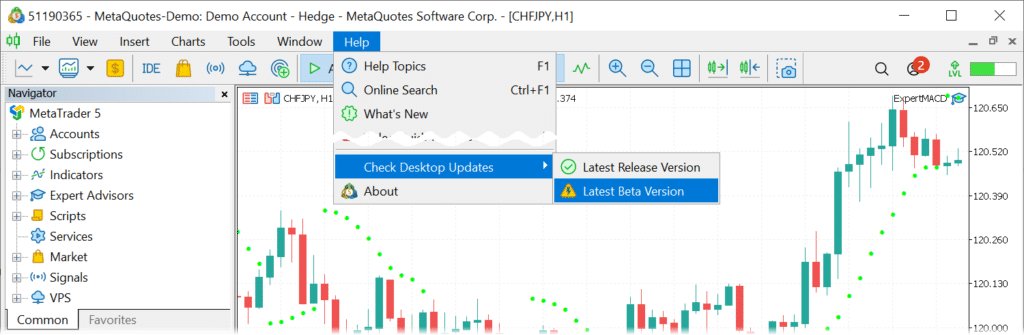
Fintech company MetaQuotes will release beta build 6360 of the MetaTrader 5 platform on Thursday, November 26, 2026.
The main highlight of this release is a significant expansion of the AI Assistant’s capabilities. The platform has added over 40 new MCP tools that enable AI agents to perform even more actions directly within the trading platform. Now the Assistant can manage MQL5 services, customize charts and graphical objects, analyze the market depth, check trading operations, and work with alerts and financial news. This allows users to delegate more complex tasks to artificial intelligence, including market analysis, trading environment customization, and trading decision making.
To start using AI features, simply sign in to the platform using your MQL5.community account. All users automatically receive access to the free MQL5 Lite plan.
For developers, the platform now offers expanded capabilities of MQL5, including the introduction of new functions for working with complex numbers and files, expanding support for complex matrices, and optimizing mathematical calculations. A large number of fixes have also been made to the strategy tester: trade calculations, tick modeling, historical data processing, and task distribution among optimization agents have been improved.
The final build of the new MetaTrader 5 platform will be released after the public beta test.
MetaTrader 5 Client Terminal
Terminal: Significantly expanded AI Assistant’s capabilities for interacting with the trading platform via MCP.
Over 40 new tools have been added that allow AI agents to manage MQL5 services, customize charts, work with graphical objects, retrieve market depth data, verify trading operations, and perform other actions directly in the terminal.
AI agents can receive a list of registered services and information about their status, start and stop services, register new instances and delete existing ones. It is also possible to obtain input parameters of services, which allows taking their settings into account when executing tasks.
- Setting up charts and working with templates
Added tools for changing the symbol and timeframe, managing display properties, navigating through history, and creating chart snapshots. AI agents can also save current chart settings to a template and delete unnecessary templates.
- Handling graphical objects
AI agents can retrieve a list of objects on the chart, create new ones, change their properties, and delete existing ones. This allows users to automatically apply trend lines, levels and other elements of technical analysis to charts.
- Access to the market depth
New tools allow users to subscribe to market depth updates and receive current Bid and Ask levels with prices and volumes. This data can be used to analyze market liquidity and order distribution.
- Checking trading operations and calculating margins
AI agents can calculate required margin and potential profit or loss, as well as pre-screen market and pending orders based on available funds and trading limits. All calculations and checks are performed without sending real trade requests.
Added the ability to view saved profiles, create new ones, switch between them, and delete unnecessary ones. This allows AI agents to manage the terminal workspace, including the set of open charts and their settings.
AI agents can create, view, edit, enable, disable, and delete alerts. For example, users can ask the Assistant to set up a notification when a certain price is reached or a set time arrives.
- Terminal info and financial news
Added tools for obtaining information about the terminal status, connection to the trading server, and system resource usage. AI agents can also receive a list of available financial news and read its contents for subsequent analysis.
- Managing test results windows
AI agents can receive information about open windows of testing results and strategy optimization, and close completed windows. This makes it easier to work with the results when testing multiple strategies sequentially.
With the new tools, AI Assistant can perform more complex, multi-step tasks, combining market data analysis, workspace customization, and trading decision preparation. For example, users can ask the Assistant to open a chart of the desired instrument, customize its display, add technical analysis levels, check the parameters of the proposed trade, and create an alert when a specified price is reached.
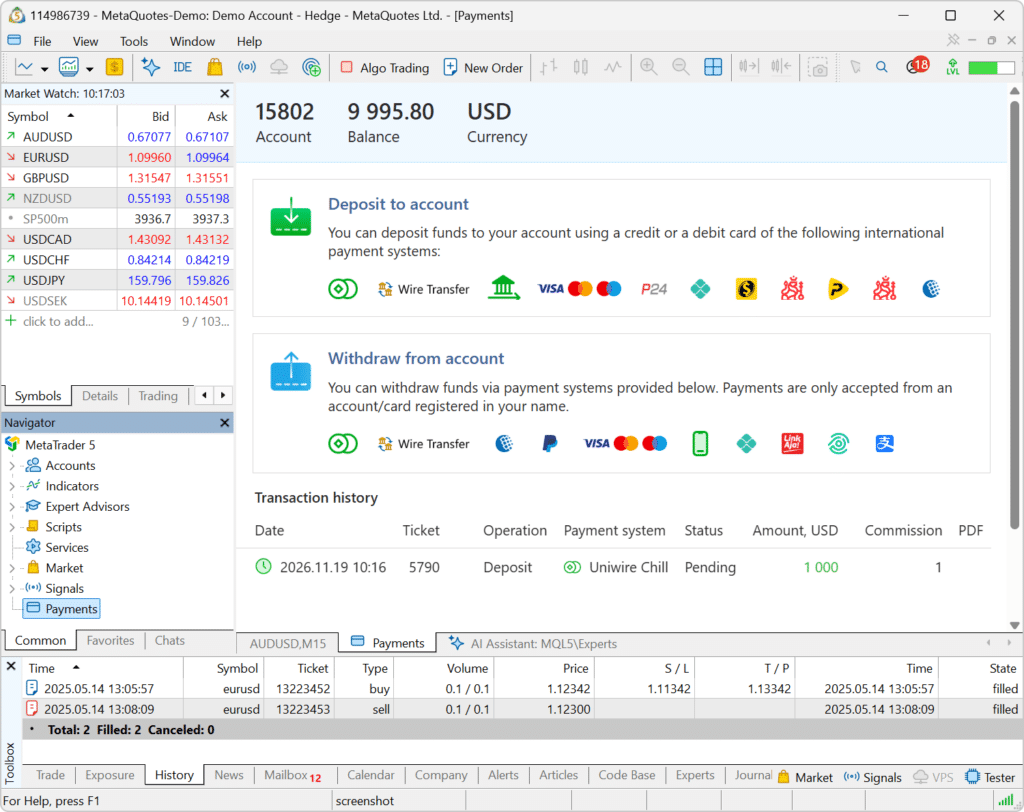
Terminal: Improved payments processing.
- Updated the main page design. The deposit and withdrawal sections have become more compact.
- Updated the design of the cryptocurrency deposit page making the process more user-friendly.
- Added the ability to download invoices for completed bank transfers.
- Fixed payment status update.
Terminal: Increased the minimum required Wine version for running Terminal on macOS and Linux. Now you will need Wine 11 or higher.
MQL5: Added new functions for writing complex numbers to files: FileWriteComplexDouble, FileWriteComplexFloat, FileReadComplexDouble and FileReadComplexFloat.
MQL5: Optimized ClassificationMetric, ClassificationScore, PrecisionRecall and ReceiverOperatingCharacteristic method calculations.
MQL5: Changed FileWrite function operation logic. Now it can work not only with text and CSV files, but also with binary ones – data is written to them without conversion. In addition, support for complex numbers has been added to the function, and the maximum number of parameters has been increased to 256.
MQL5: Added a universal version of the FileRead function to read multiple values from CSV, TXT and BIN files. It mirrors the FileWrite function. Parameters are passed by reference, the function returns the number of values read. Reading strings from binary files is not supported because their length is not known in advance.
MQL5: Added functions for converting complex numbers to strings and back: ComplexToString and StringToComplex. Also fixed formatting complex numbers.
MQL5: Added support for complex matrices for the following matrix and vector methods:
Product: Power, Kron, Inner, Outer, CorrCoef, Cov, Correlate and Convolve. The Power method uses the OpenBLAS functions GETRF, GETRI and GEMM. The calculation of the matrix degree has also been optimized.
Transformation: Cholesky, Eig, EigVals, LU, LUP, QR and SVD. Both real and complex calculations are performed using the corresponding OpenBLAS functions.
Features: Norm, Cond, Det, SLogDet, Rank, Trace and Spectrum. OpenBLAS GETRF is used to calculate the determinant, and GESVD is used to calculate the rank.
MQL5: Changed the logic for calculating the matrix spectrum using the Spectrum method. Previously, for all matrices, eigenvalues were calculated from the product AT * A. Now the calculations depend on the matrix type. For square symmetric and Hermitian matrices, the eigenvalues are calculated using the OpenBLAS SYEV and HEEV methods, respectively; for other square matrices, GEEV is used. For rectangular matrices, singular values are calculated using GESVD.
MQL5: Changed the calculation logic for the spectral norm of a matrix: it is now equal to the maximum modulus of complex spectrum values (spectral radius). In some cases it coincides with the matrix 2-norm (MATRIX_NORM_P2).
MQL5: Improved numerical stability of matrix calculations: quadratic norms, Softmax activation function, and pseudoinverse matrix. Also fixed the handling of invalid numbers when calculating quantiles and percentiles.
MQL5: Fixed errors in matrix and vector operations. Unified checks for dimensions, indices, band storage, permutations, sparse COO matrices, and SSA input parameters; handling of BLAS errors and MatrixPower boundary values. Also fixed ArrayArgSort, Tri, Row, Col and ConfusionMatrix.
MQL5: Changed alignment of inherited structures with pack(N). This is a change in data presentation compatibility.
The update will be available through the Live Update system.