ZDNET’s key takeaways
- Microsoft’s To Do app is being retired next June.
- Microsoft recommends Planner for work and school users.
- Todoist is my top recommendation for a robust, friendly to-do app.
Those of you who use Microsoft To Do to manage your tasks will have to find a replacement next year.
In a recent support document spotted by Windows Latest, Microsoft announced that its To Do app will be retired as of June 30, 2027. This move will kill the program for all Microsoft accounts, including work, school, and personal. The To Do website, desktop apps, and mobile apps will go down the drain at the same time.
Also: I’ve been using an MS Word clone for a month – and I love it even more now
The underlying To Do service, APIs, and related synchronization support will also be retired at later dates, which Microsoft said it will announce at some point.
With the To Do retirement deadline now seven months away, what should a die-hard and dedicated user do? Microsoft’s support document provides some guidance. If you use the To Do app with a work or school account, Microsoft recommends transitioning to Microsoft Planner. Available as a website and as a mobile app for iOS and Android, Planner lets you create plans to which you and others in your organization can add specific tasks.
The problem(s) with Microsoft Planner
In my experience, though, Planner lacks the simplicity and user-friendliness of To Do. Microsoft promises that an updated My Tasks feature will start rolling out to Planner in December, making it easier to capture, manage, and work with your private tasks.
Also: 5 apps I always install on new Windows PCs – and most are free
However, there’s still an obstacle in switching to Planner. Your existing tasks from the To Do app will be visible in Planner up to the June 27 deadline. But after that date, you’ll no longer be able to view or manage them in Planner. Plus, the data won’t be moved to your new private Planner plan.
But wait, the news gets even worse. To Do users with personal Microsoft accounts, including subscriptions to Microsoft 365 Personal and Family are out of luck as Planner won’t even be available as an option. Planner is designed strictly as an organizational tool for workplaces and schools.
On the bright side, Microsoft says it will provide a way to export your To Do data before the app is retired. At that point, the company will reveal the instructions, supported data, requirements, and limitations for this process. Of course, Microsoft cautions that the export is designed only to preserve data, and such an export doesn’t mean the content could be imported into Planner or another application.
Yes, in typical Microsoft fashion, Microsoft is not only killing off a popular app, but it’s making the transition as confusing and difficult as possible. That brings us back to the question I posed earlier. What should a die-hard and dedicated To Do user do?
I’m not a big fan of Planner, though I’ll reserve final judgment until I see the updated My Tasks feature, due to arrive in December. Otherwise, I think it’s time to give Microsoft the boot here and consider a completely different app. Toward that end, here are four alternative to-do apps, ranging from simple to more advanced.
1. Apple Reminders
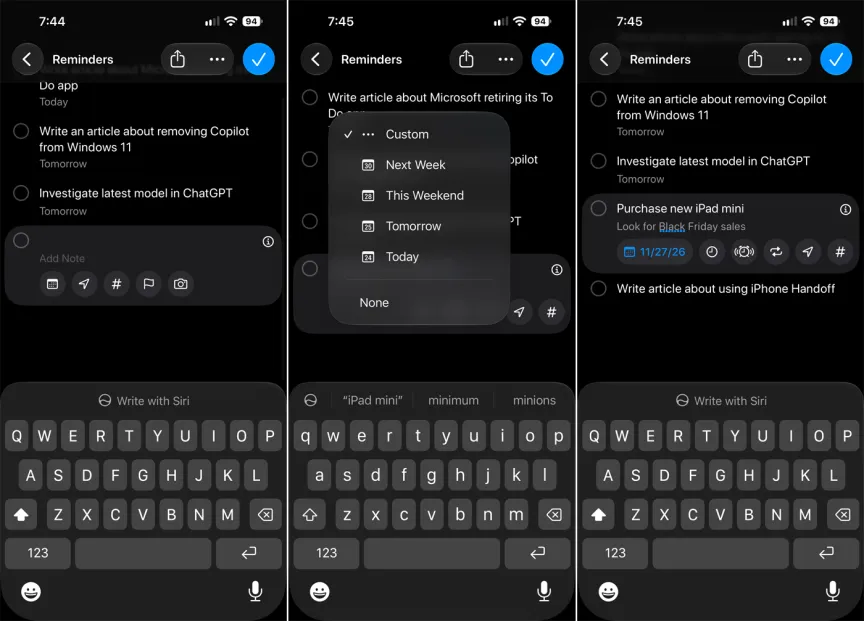
If you use an iPhone, iPad, or Mac, and your task management needs are simple, Apple’s Reminders app is a good choice. As an iPhone user, I use Apple Reminders to keep track of my to-do items and lists. Just tap to add a new item. You can then assign a due date and time, mark it as urgent, set it to repeat, and get an early reminder before the task is due.
You’re able to tag tasks, set up subtasks, and give tasks a priority. You can also set up reminders to pop up when you arrive at or leave a certain location, or when you send a message to a specific contact. You can also attach an image or scanned document to the task.
Also: My favorite Windows app makes moving to a new PC so easy
Even further, you can share your reminders with other people, either as static lists or as live linked lists to which all of you can contribute. Finally, you’re able to sort your list by different criteria, view it as columns, save a customized list as a template, and automatically have the list arranged by category.
 Screenshot by Lance Whitney/ZDNET
2. Google Tasks
If you already use Google for your email, calendar, and contacts, Google Tasks is a natural fit. Accessible on the web, as an Android app, and as an iOS app, Google Tasks is another basic but effective to-do app if your needs are relatively simple.
You can create different lists in which to store and organize your tasks. Adding a task couldn’t be easier. Just give your task a title and add any details you wish. Then schedule it for a specific date and time and set it to repeat if you wish. After the task appears, you’re able to add a subtask, include an attachment, and move it to a different list. And that’s about it. Quick and easy.
 Screenshot by Lance Whitney/ZDNET
3. Todoist
Want a more advanced to-do app? Todoist is worth a look. Calling this one ubiquitous is an understatement, as you can run it on a variety of platforms, including the web, iOS, iPadOS, Android, Windows, Mac, Apple Watch, as a browser extension, and as an email add-on. The basic app is free and should suffice for most individuals. A Pro version with more features and customizations will run you $7 a month or $60 a year and is suited for individuals, groups, and teams.
To start off, you create different projects in which to store and organize your tasks. For each task, you can easily set a due date and time, add a description, assign a priority, include a label, and set it to recur at different intervals. Plus, you’re able to break down larger and more complex tasks into subtasks and sections. I especially like the way you can quickly dictate a task using the built-in Ramble dictation tool.
Todoist shines at presenting and displaying your tasks. You can view your tasks by date, filters, labels, or projects, so you know which are most pressing or important. There’s even a calendar view that shows you all upcoming tasks for the weeks and months ahead. A built-in search lets you track down tasks based on different criteria. And you’re able to save any task as a template for adding similar tasks in the future.
Whether you’re looking for a solid to-do app for yourself or your organization, you won’t go wrong with Todoist.
 Screenshot by Lance Whitney/ZDNET
4. Tick Tick
Tick Tick is another solid to-do program geared for individuals and groups. You can run this on a variety of platforms, including the web, iOS, iPadOS, Android, Windows, MacOS, Linux, and as a browser extension. Free to anyone, the basic version allows up to nine lists with as many as 99 tasks per list. Priced at $49.99 a year, the Premium flavor grants up to 299 lists with as many as 999 tasks per list.
After you sign up, Tick Tick kicks things off by asking how you plan to use it and what default to-do lists you want. At the main screen, you’re able to create more lists to house your different tasks. Adding a task is simple enough. Just enter the name and choose the due date and time. You can then assign a priority to the task, pin it, add a subtask, duplicate it, or convert it into a note.
Even further, you’re able to include a comment, an attachment, a tag, and a linked task. You can even add multiple comments and format them by headings or by different lists such as bullet points and checklists.
Also: You can now restore Windows 11 even if it can’t boot up – here’s how
After you’ve added a range of tasks, you can rearrange them by dragging and dropping each one. You can also group or sort them by due date, created time, title, or priority. You can even view your tasks in a Kanban view, which displays them in rows and columns so you can better visualize them.
The free version of Tick Tick will do the trick if you just need a basic task organizer. But the paid edition lets you assign a duration to a task, get due date reminders via email, spice up your tasks with themes, and tap into the program’s AI.
 Screenshot by Lance Whitney/ZDNET
Among the four apps here, Todoist is my favorite for its simplicity and ease of use. But you can’t go wrong with any of the four if you need an effective to-do app once Microsoft To Do is officially gone.

See full bio