ZDNET’s key takeaways
- CobaltX is a Linux distribution that games right out of the box.
- Based on Arch Linux with the Linux-zen kernel, it performs well.
- You can install and use CobaltX for free.
Although I don’t consider myself a hardcore gamer, I do play nearly every day. If I’m playing a game on a PC, you can bet I’m doing so by way of Linux. Five or so years ago, that probably wouldn’t have been the case, but thanks to vast improvements from the likes of Steam, Lutris, and other platforms, gaming on Linux has come a long, long way.
Also: Wine 11 might finally push gamers from Windows to Linux
Another reason for this evolution in Linux-based gaming is the latest crop of gaming-focused distributions, such as Bazzite, Nobara, and CachyOS. And now there’s a new distro you can add to that list: CobaltX.
What is CobaltX?
CobaltX is based on Arch Linux, and it includes the usual sample of preinstalled gaming tools, such as Steam, Heroic Games Launcher, Lutris, Bottles, RetroArch, GameMode, and MangoHud. On top of the preinstalled games, you get one-click driver installation for Nvidia hardware and package access to the AUR via the yay command.
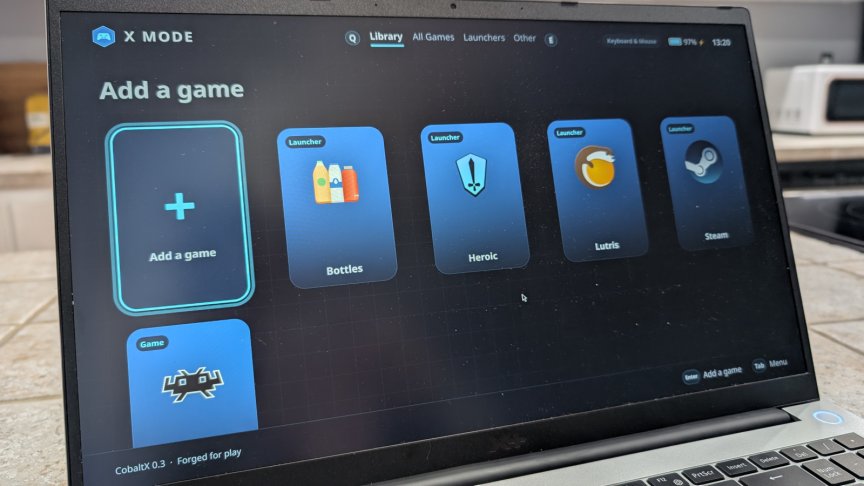
But CobaltX has another trick up its sleeve: X Mode is a unique desktop environment that switches CobaltX from a standard KDE Plasma desktop to a controller-friendly interface mode designed for handheld gaming devices (think ROG Ally or Legion Go) and TV setups.
X Mode
But X Mode is not limited to handhelds and TVs. You can also use X Mode on your standard laptop or desktop and interact with it via your favorite game controller. While you can also control this mode with a trackpad or mouse, it was designed to be used more like a handheld gaming console (or, as I mentioned, with a game controller).
 Jack Wallen/ZDNET
X Mode is laid out with a set of tabs at the top of the screen (Library, All Games, Launchers, Other) and a system tray for selecting your controller and checking battery life. Below that, you’ll find launchers for game apps/services like Bottles, Heroic, Lutris, Steam, and RetroArch. You can add other launchers for more games or even non-game apps.
Also: This Linux distro is the dream pick for gamers
You can switch between standard mode and X Mode from within the KDE Plasma menu or by hitting Escape when in X Mode.
How does CobaltX perform?
CobaltX is still in early development, so there are bound to be issues. For instance, it took me several tries to install the OS, and it didn’t succeed until I made sure to enable swap during the installation.
Also: My top 5 Linux alternatives to Windows
It’s also important to note that the machine you install CobaltX on must have UEFI; otherwise, the OS won’t boot. And if you attempt to install the OS as a virtual machine, it will crash every time (so don’t even try). With the right hardware, however, CobaltX performs like a champ.
I also had the OS crash on me once during a system upgrade. Fortunately, a reboot recovered everything without fail.
Finally, there was an odd KDE Plasma issue where All Apps in the desktop menu showed nothing installed. I could search for an app, and it would be there; I just couldn’t see it in the menu. Once an app was launched, it would then appear in the menu.
Other than those issues, CobaltX performed very well. The KDE Plasma desktop was straight up, with no frills, and apps ran as expected. Of course, X Mode was a real treat.
Also: All Linux gamers should take the latest Bazzite seriously
CobaltX uses the Linux-zen kernel, which dramatically reduces desktop latency and boosts responsiveness under heavy load. CobaltX includes Mesa and Vulkan support for Intel and AMD hardware, and a one-click installer for proprietary Nvidia drivers. If your machine is powered by an Nvidia GPU, I would highly recommend taking care of that before you attempt to play any games.
Given that this is a gaming-focused distribution, it seemed necessary to see how well it performed when playing games. For that, I started Steam (and had to wait for it to download all of the necessary components … fun times). Steam is my go-to for PC gaming, so I know it well.
 Jack Wallen/ZDNET
I played the Wyldheart Demo, and it was as smooth as if I were playing it on a dedicated console. I will say this: I don’t like gaming with a keyboard, so a controller is a must-have, and it’s very easy to set up in CobaltX. In fact, I had zero issues playing games through Steam on this distribution, and CobaltX made playing games via Steam simple and enjoyable.
CobaltX pros and cons
Pros
- You get out-of-the-box gaming with all major launchers and preconfigured compatibility layers.
- Resource demand is modest.
- Gameplay is smooth (with the right hardware).
- X Mode is an easy way to turn the desktop into a gaming console.
- Graphics are outstanding (again, depending on your hardware).
Cons
- Requires UEFI (will not boot with legacy BIOS).
- Installation can be a bit finicky.
How CobaltX stands up against Bazzite
As for gameplay, both CobaltX and Bazzite play very well. I’d go so far as to say they are on equal footing. The biggest difference is getting there. With Bazzite, you get pre-installed Nvidia drivers, which means the time from OS installation to gameplay is shorter. Yes, CobaltX has a one-click driver installation tool, but having those drivers installed out of the box means those with less Linux experience won’t have to fiddle with that task. And although the one-click tool is easy to use, it’s still one step you don’t have to take with Bazzite.
On the other hand, X Mode is pretty cool, but Bazzite has its Steam Gaming Mode (designed specifically for handhelds), so that’s a wash.
Finally, Bazzite has the benefit of time on its hands, as it’s been around for a while and has had the luxury of working out a lot of the kinks.
Also: 3 ways the new Steam Machine could be a huge win for Linux
All in all, I found CobaltX to be a well-done, gaming-focused Linux distribution that should hold up well against established distros such as Bazzite. Given that this is a relatively new distro, it could be a major player in the near future. Would I choose it over Bazzite? Not at this juncture. Currently, among all gaming-focused Linux distributions, Bazzite offers the simplest experience from OS installation to gameplay.
Give CobaltX some time, however, and it might knock Bazzite off the top of that hill.

See full bio