You may recall an update back in August that first introduced the concept of an app lock to Pixel phones. Google initially rolled out a version through the Android 17 QPR2 Beta program, only to remove it when the update went stable a month later.
Today, Google essentially re-confirmed that App Lock is a thing for Android 17 and it has returned in the latest Android 17 QPR3 build that rolled out last week. They also told us when it’ll go stable, how to use it, and if there are any limitations.
If you are curious about the timing of this re-release, well, Samsung gave us One UI 9.5 today and it includes App Lock.
Android 17 App Lock Returns: How to Use It
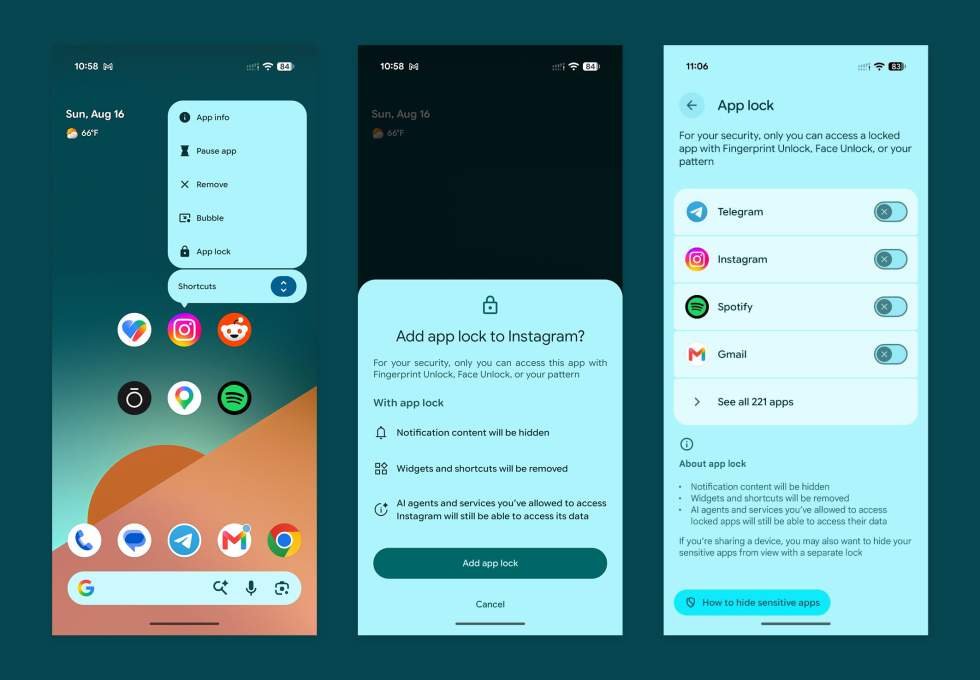
App Lock, for those unfamiliar, is a feature that is now a part of Android 17 QPR3 Beta that allows you to lock an app behind PIN, pattern, password, or biometric (fingerprint and face work) locks. This means you can secure an app and no one else will be able to open it unless they know your unlock.
I’m sure you can understand the importance of a feature like this. If your phone ends up in the hands of someone you’d rather not have open access to all the things, this would stop them from opening your messaging or dating app or social media services or Google Photos library. You get the point.

To use App Lock on Android 17, it’s super easy and you would do the following:
- Long-press on an app on your home screen or in your app drawer
- Choose the “App lock” option
- Then tap the “Add app lock” option that pops up
- Confirm your security (like a fingerprint)
- And that’s it – your app is now locked
Once locked, opening is super simple. If you have biometric lock setup, you can easily open and unlock the app with your fingerprint or face. However, if you aren’t using those, you would have to enter your PIN, pattern, or password.
To remove an app lock, you do the same process, only you would choose “Remove app lock” after long-pressing on the locked app. You would also have to enter your secure layer to finish off removing it.
Google plans to fully rollout App Lock in Android 17 in Q1 of 2027. That should be the time that QPR3 goes stable and brings the next Pixel Drop set of features.
If you’d like to use App Lock today on your Pixel phone, you will need to enroll in the Android Beta Program (here) and grab the latest Android 17 QPR3 Beta.