

My wife has always preferred to keep technology at arm’s length. Having spent most of her life as a homemaker, she had little reason to interact with computers, which she regarded as rather esoteric objects. Smartphones changed all that a few years ago. She reluctantly embraced the technology and had to navigate the whole mumbo jumbo of the app world: apps, taps, long presses, three dots, and so on!Today, she can manage most of what she needs to do. But whenever she encounters something new, she summons one of us for help. She often marvels at how the rest of us seem to know these things already.Good question! How do we know?There was a time when learning to use software meant reading user manuals. Most people hated them, and rightly so. As software evolved, developers began focusing on intuitive interfaces, contextual help, and in-app tutorials. The ambition was to make applications so easy to use that extensive documentation would no longer be necessary. The familiar, rather uncharitable acronym RTFM gradually became less relevant.Most of us follow a basic user-interface design principle every time we use a mobile app, often without even realizing it. It has become almost instinctive for smartphone users: first, we select something we want to work with; then we choose what we want to do with it. Or, in some cases, we choose an action first and then select the object on which to perform it.I remember discussing these two interaction paradigms in the early days of software development: object-action versus action-object.
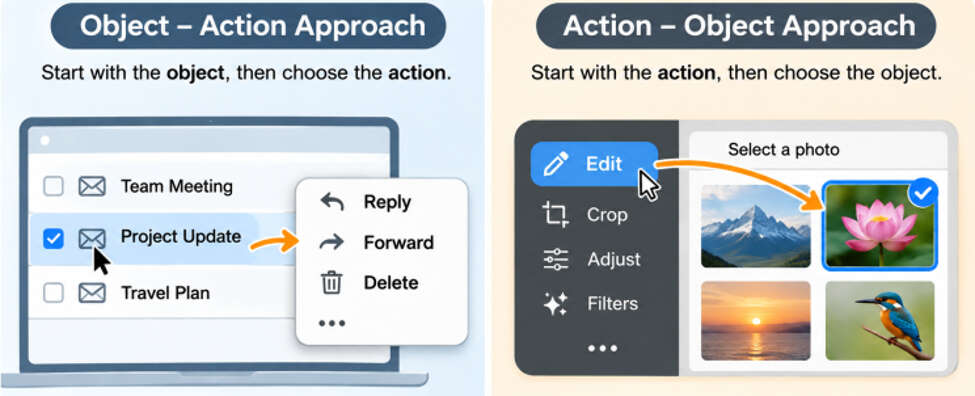
Object and action approaches
The object-action approach begins with the thing you want to work on. In an email application, for example, you select an email first and then choose what to do with it: reply, forward, delete, and so on.The action-object approach starts with the action. You choose what you want to do first and then select the object on which to perform it.This distinction is still useful when exploring applications. Sometimes we know the object we want to work with but haven’t discovered all the actions available for it. At other times, we know what we want to accomplish but haven’t explored how the app can help us do it. The trick is to remain curious about both.Once you become familiar with these interaction patterns, using new apps becomes much easier. You begin to recognize familiar cues such as tapping, long-pressing, and selecting an object before choosing an action.But there’s an important distinction:Knowing how to use an app is not the same as knowing what the app can do.Familiarity can be a productivity trapEven those of us who are reasonably tech-savvy can fall into this trap. Once we know enough to get by, we become complacent. We stop exploring the apps we use every day.That’s unfortunate because applications keep evolving. New features are introduced, existing ones are improved, and useful capabilities often remain unnoticed. We end up doing things manually when the app could have done them for us, or struggling with a limitation that may not exist at all.In other words, we leave productivity gains on the table.
What might you be missing?
Let’s look at a few examples from applications many of us use regularly.1. Features that make everyday tasks easierA feature you didn’t know existed could save you considerable time or effort.The other day, my brother mentioned a drawback of Audible: he missed the illustrations that accompanied the text in the printed book. I pointed out that the Audible app provides access to supplementary PDF material for supported titles. He was pleasantly surprised!I had a similar discovery myself. I was delighted to learn that I could bookmark passages and take notes while listening to an audiobook. These are small features, but they make the reading experience much richer.I’m also fond of WhatsApp stickers. Emojis are great for conveying emotions, but stickers take visual expression a step further. With their transparent backgrounds, they blend naturally into conversations and can convey not just emotions but also ideas, reactions, and humour, much like little pictorial memes. I used to install dedicated apps to create stickers from pictures I liked. Recently, while sharing a sticker, I noticed that WhatsApp allowed me to create one right within the app itself. That saved me the trouble of installing and maintaining yet another application..2. Features that personalize your experienceMany apps offer settings that let you tailor the experience to your preferences. Yet we often continue using the default settings without realizing how much we can change.Kindle, for instance, lets you adjust font size, font style, spacing, and other reading preferences. A few small adjustments can make reading much more comfortable.I had a more practical discovery with Microsoft Teams. Since I work with colleagues in the USA while living in India, the time difference occasionally creates an inconvenience. Someone might accidentally start a group call while I’m asleep at 3 AM.I didn’t want to silence my phone completely because I needed to remain reachable in an emergency. Then I discovered a useful feature in the Teams mobile app called Quiet Time, which allows notifications to be blocked during specified hours.That little discovery made a big difference. I could sleep undisturbed and check any accidental calls in the morning.3. Features that automate repetitive workSome of the most valuable app features are those that eliminate the need to remember or repeat routine tasks.Banking apps, for example, may offer automatic bill payments, recurring transfers, scheduled payments, and mobile cheque deposits. These capabilities can reduce manual effort and help us avoid missing routine financial obligations.The same principle applies to many other applications. Look for opportunities to automate repetitive actions rather than continuing to perform them manually.How to discover what you don’t knowKnowing that useful features exist is one thing. Developing the habit of discovering them is another. Here are a few ways to make exploration part of your regular digital routine.
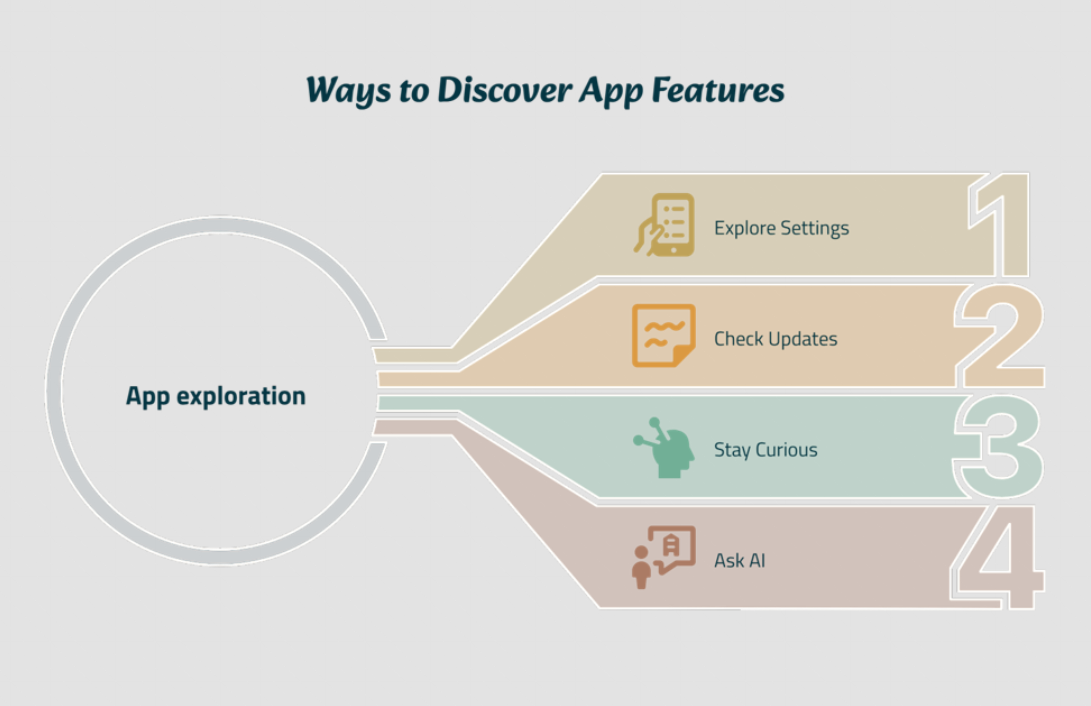
Ways to discover app features.
1. Explore the Settings menu.The settings menu is often a treasure trove of useful capabilities. Spend a little time exploring it. Gmail, for example, has numerous features and customization options, some of which aren’t enabled by default.The same is true of Microsoft Office applications. They offer a wealth of settings and features tucked away from the regular menus, partly because they may not be relevant to most users. Yet, some of these lesser-known features can be incredibly powerful for a specific use case.My brother, who is a radiologist, once told me how he uses the AutoCorrect feature in MS Word. He has stored standard medical terms and frequently used phrases as AutoCorrect entries. All he needs to do is type a predefined abbreviation or shortcut, and boom! MS Word replaces it with the entire phrase.A feature that most of us might overlook has become a real time-saver for him.2. Pay attention to updates and release notes.App developers regularly introduce new features and improvements. Don’t simply dismiss update notifications. Occasionally look at what’s new and see whether anything could improve the way you work.Interestingly, WhatsApp regularly sends messages announcing new features and updates. Since I use WhatsApp extensively, I make it a point to check these messages whenever they appear. That’s how I recently discovered the Member Tag feature, along with several other useful additions over time.It’s a simple habit: pay attention when the apps you use tell you what’s new. You might discover something useful!3. Stay curious.Don’t assume that you know everything about an application just because you use it every day. Explore its menus, look for unfamiliar icons, and try out options whose purpose isn’t immediately obvious. You might discover something surprisingly useful.In Freeplane, the mind-mapping application I use on my laptop, I recently discovered a one-click option to rearrange child nodes in different ways. It’s a small feature, but it saves me the trouble of manually moving nodes around to get the layout I want.Even an application you use regularly can surprise you with something you hadn’t noticed before! This happened to me with Google Chrome.I knew I could arrange windows side by side on my Windows desktop to work with two applications simultaneously. But what if I wanted to do the same with two tabs in Google Chrome?My workaround was to pull one tab out into a separate window and then use Windows’ tiling facility to arrange the two windows side by side.One day, I wondered whether Chrome itself offered a way to do this. I selected the two tabs, right-clicked, and explored the context menu. And there it was! The option I was looking for.A little curiosity saved me a workaround. Before assuming an app cannot do something, explore its menus. The feature you need might already be there.4. Ask AI.This is perhaps the most powerful way to explore an application today. Ask ChatGPT or another AI assistant how to accomplish something in an app. More often than not, the AI will respond affirmatively and walk you through the steps to achieve it.You can also ask it to suggest useful features you may have overlooked. But don’t stop at discovering existing features. Dare to get AI to write code for you. This is where things get really interesting. You can create substantial automation by getting AI to generate small programs or scripts tailored to your needs.Think of VBA macros in Microsoft Office or Google Apps Script in Google Workspace. Tasks that once required considerable programming knowledge can now be automated with AI’s help. Describe what you want to achieve, ask AI to write the code, and let it guide you through implementing it.In my view, this is where we can unlock some of the greatest productivity gains from AI: not merely learning to use our apps better, but making them work harder for us.
Make exploration a habit
We don’t have to master every feature of every application we use. Nor should we spend hours exploring menus in search of something that might never be useful.The idea is to develop a habit of occasional exploration. When you encounter a limitation, pause before accepting it. There may already be a feature that solves your problem. When an app is updated, take a moment to see what’s new. And every now and then, explore an application you use daily with fresh eyes.The next time you open WhatsApp, Audible, Kindle, your banking app, or any other familiar application, ask yourself: Am I using this app to its full potential, or have I simply learned enough to get by?You might discover that a feature you’ve overlooked for years could save you time every single day.After all, being organized isn’t just about organizing what you have. It’s also about making better use of the tools at your disposal.
Disclaimer: Views expressed above are the author’s own.